Choosing the right brand is one of the most important decisions for Amazon wholesale and online arbitrage sellers. A brand may look profitable at first glance, yet be gated, dominated by Amazon Retail, or crowded with sellers fighting for the Buy Box.
Analyzing products one by one wastes time and often leads to costly sourcing mistakes. Seller Assistant’s Brand Analyzer solves this by automating brand-level research.
It shows revenue potential, competition intensity, catalog size, and reseller viability in minutes – so you can qualify brands before contacting suppliers or investing in inventory.
Note. Seller Assistant is an end-to-end Amazon workflow management platform that integrates 15+ wholesale-focused solutions into one connected system. It combines sourcing workflow automation, bulk research and intelligence tools, and integrated Chrome extensions – giving you everything you need to streamline finding deals, managing suppliers, and creating purchase orders.

The platform aggregates: workflow management tools – Purchase Orders Module, Suppliers Database, Product Database, Warehouses Database, FBA Shipments to organize, automate, and scale every step of your wholesale and arbitrage operations; bulk research & sourcing tools – Price List Analyzer, Bulk Restriction Checker, AI Supplier Finder, Brand Analyzer, Seller Spy to evaluate supplier price lists, verify selling eligibility and restrictions, open new brands, and discover winning product ideas from competitors to expand your product catalog; Chrome extensions – Seller Assistant Browser Extension, IP-Alert Extension, and built-in VPN by Seller Assistant to deep-research products, check IP claims and compliance, and access geoblocked supplier sites directly within your browser; and integrations & team access features – seamless API connectivity and integrations with Zapier, Airtable, and Make, plus Virtual Assistant Accounts for secure, scalable team collaboration.
With Seller Assistant, every step of your Amazon wholesale and arbitrage workflow is automated and connected.
Why Amazon Wholesale Sellers Must Analyze Brands First
Many sellers start with product-level research – checking BSR, price, and Buy Box rotation on individual ASINs. That approach often leads to wasted time and risky inventory decisions. Brand-level analysis gives you a wider view of competition, Amazon Retail presence, catalog depth, and revenue stability before you ever contact a supplier. When you evaluate the brand first, you avoid sourcing products that are gated, oversaturated, or structurally unprofitable.
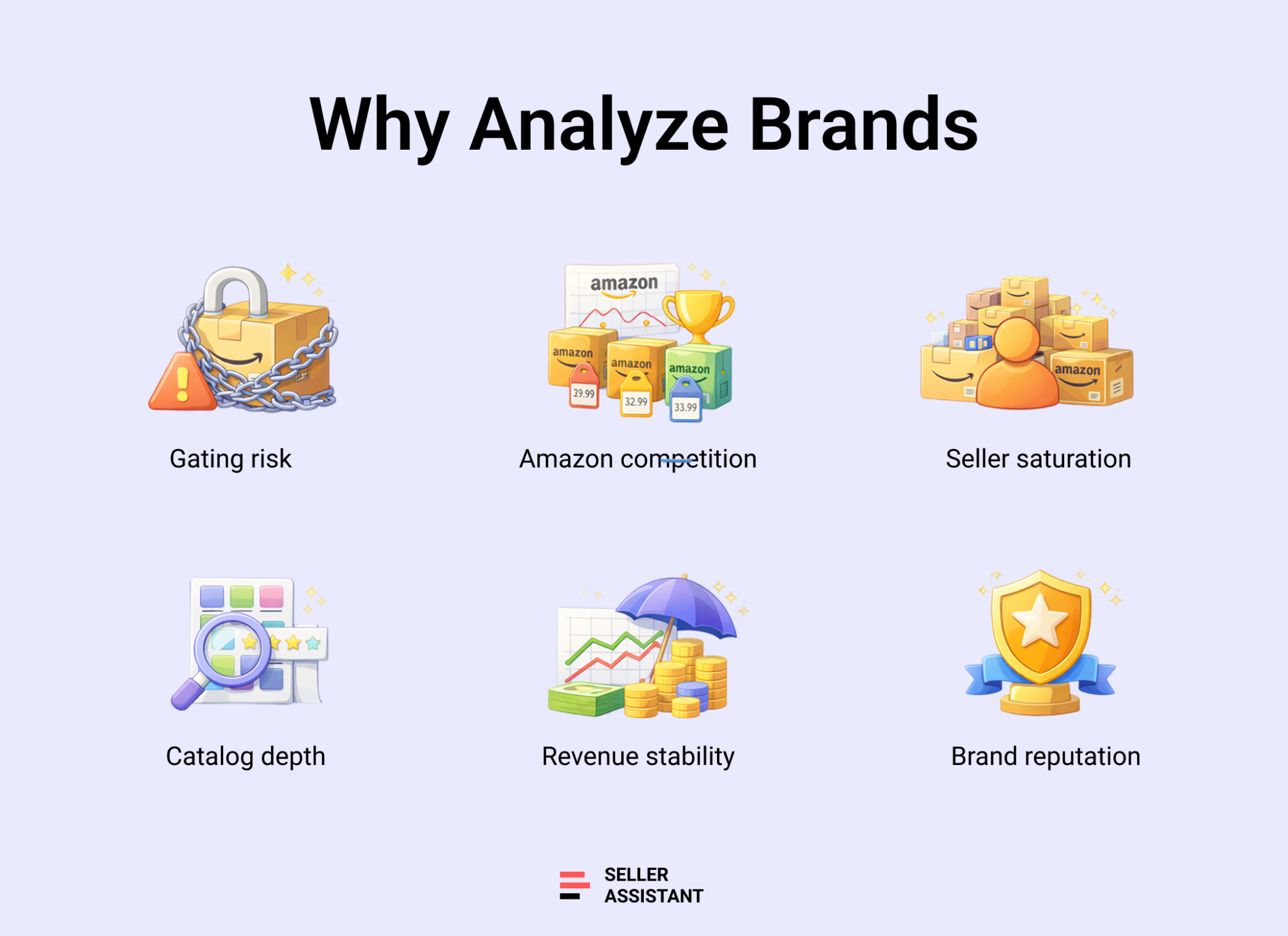
Account approval and gating risk
Some brands require approval, invoices, or direct authorization. Others are not eligible on your seller account. If you skip this step and focus only on individual products, you may secure inventory you cannot list. Brand analysis helps you confirm selling eligibility before investing capital.
Amazon Retail and Buy Box pressure
When Amazon holds a large Buy Box share across a brand’s catalog, third-party sellers struggle to compete. Even strong products become difficult to scale. Checking Amazon Buy Box rate at the brand level reveals whether you’re entering a winnable market or a controlled ecosystem.
Seller density and margin compression
High average FBA seller counts across listings often signal price wars and unstable margins. Instead of discovering oversaturation product by product, brand-level metrics show whether competition is manageable across the entire catalog.
Catalog depth and scalability
Brands with hundreds of active ASINs offer room to expand. Smaller catalogs – often private label brands – limit sourcing options and increase dependency on a few listings. A larger catalog supports long-term scaling and diversified revenue.
Revenue consistency across ASINs
One or two strong products do not guarantee brand viability. Stable monthly revenue distributed across multiple ASINs indicates reliable demand. Brand-level revenue estimates help determine whether the opportunity supports consistent cash flow.
Brand reputation and customer trust
Average rating and total review volume reflect product quality and buyer satisfaction. Brands with strong ratings tend to maintain healthier pricing and Buy Box stability. Reviewing reputation at the brand level reduces the risk of selling weak or declining products.
What Is Seller Assistant’s Brand Analyzer?
Seller Assistant’s Brand Analyzer is an Amazon wholesale brand research and analytics tool designed for wholesale sellers, online arbitrage sellers, and dropshippers. It helps sellers evaluate brands before investing time in supplier outreach, product research, or inventory purchases. Instead of manually reviewing hundreds of listings, Brand Analyzer provides a complete view of a brand’s performance, competition, demand, sourcing potential, and resale opportunity from a single workspace.
Multi-level brand analysis
Brand Analyzer evaluates opportunities at several levels, allowing sellers to move from broad brand research to detailed sourcing decisions.
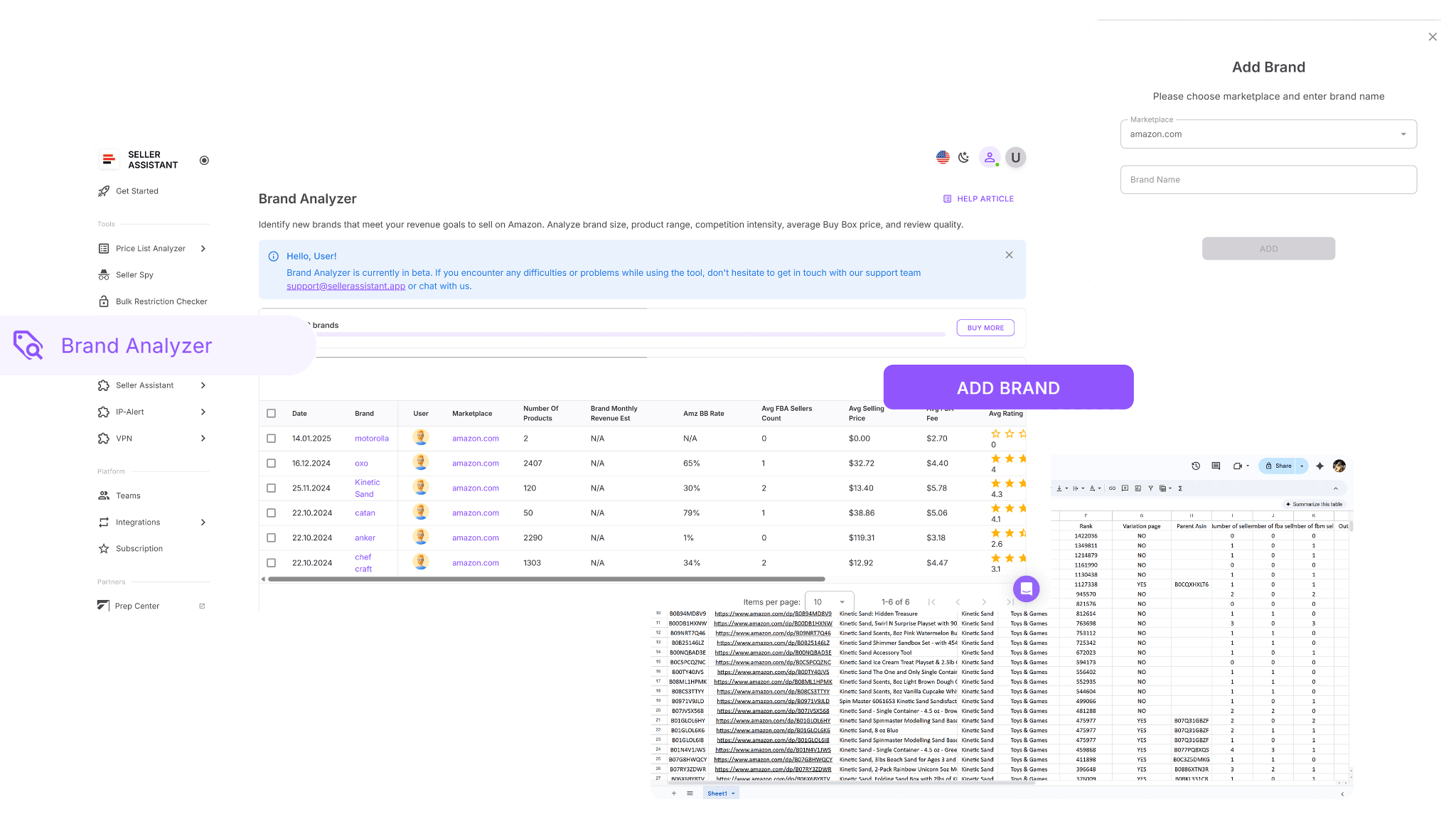
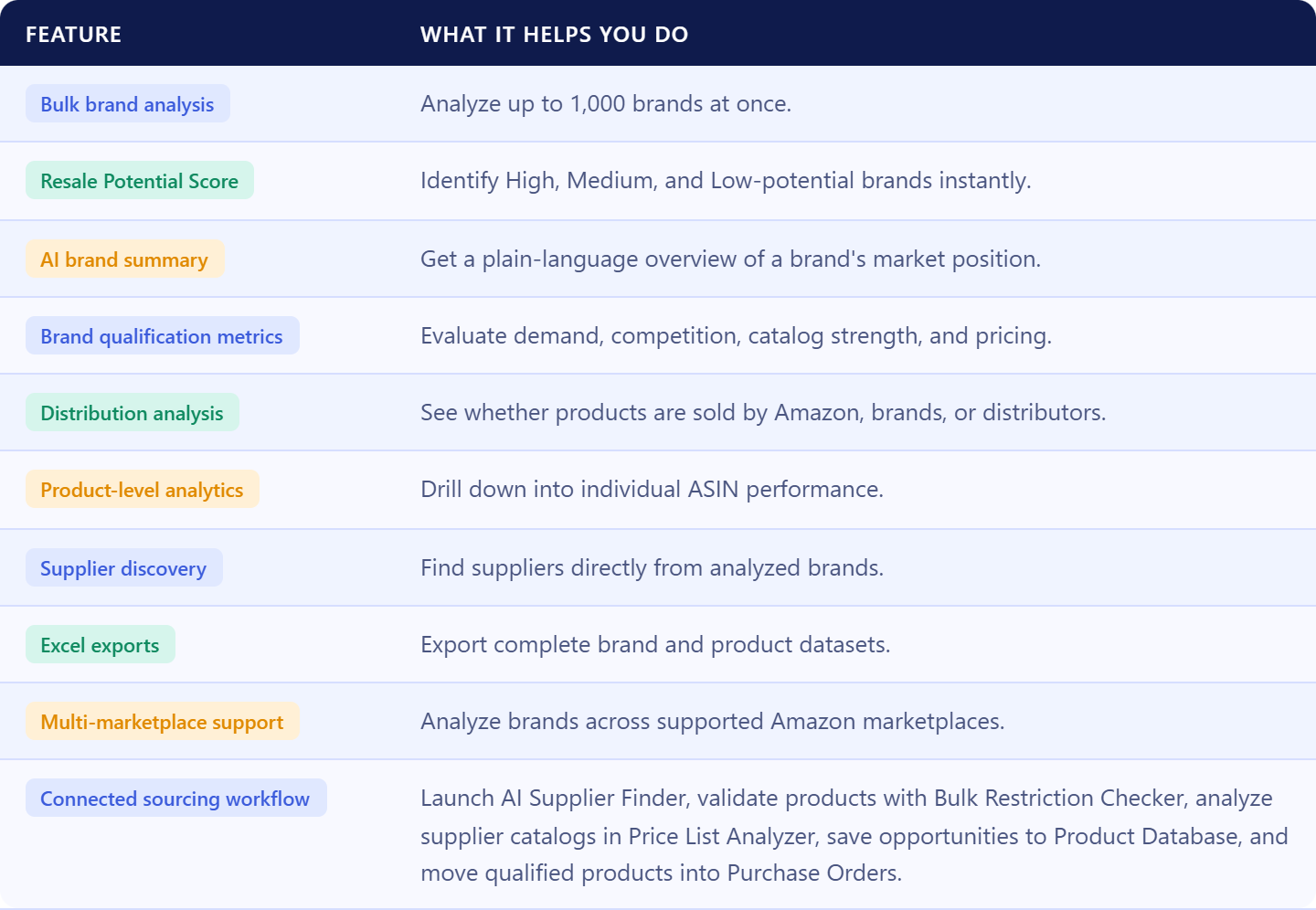
At the portfolio level, sellers can analyze up to 1,000 brands simultaneously, making it easy to evaluate supplier catalogs, distributor lists, competitor storefronts, trade show prospects, and other large groups of opportunities. Brands are processed concurrently, allowing teams to research opportunities at scale.
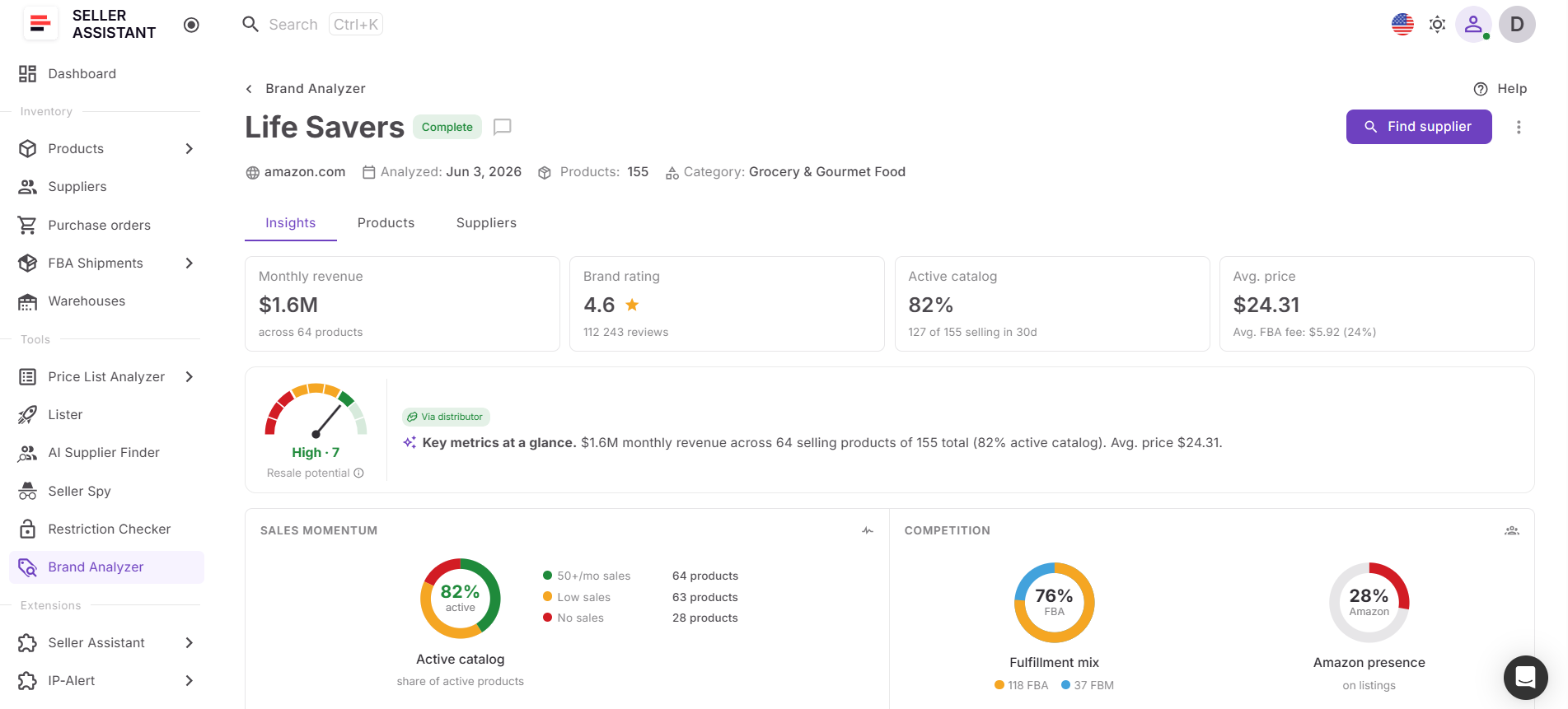
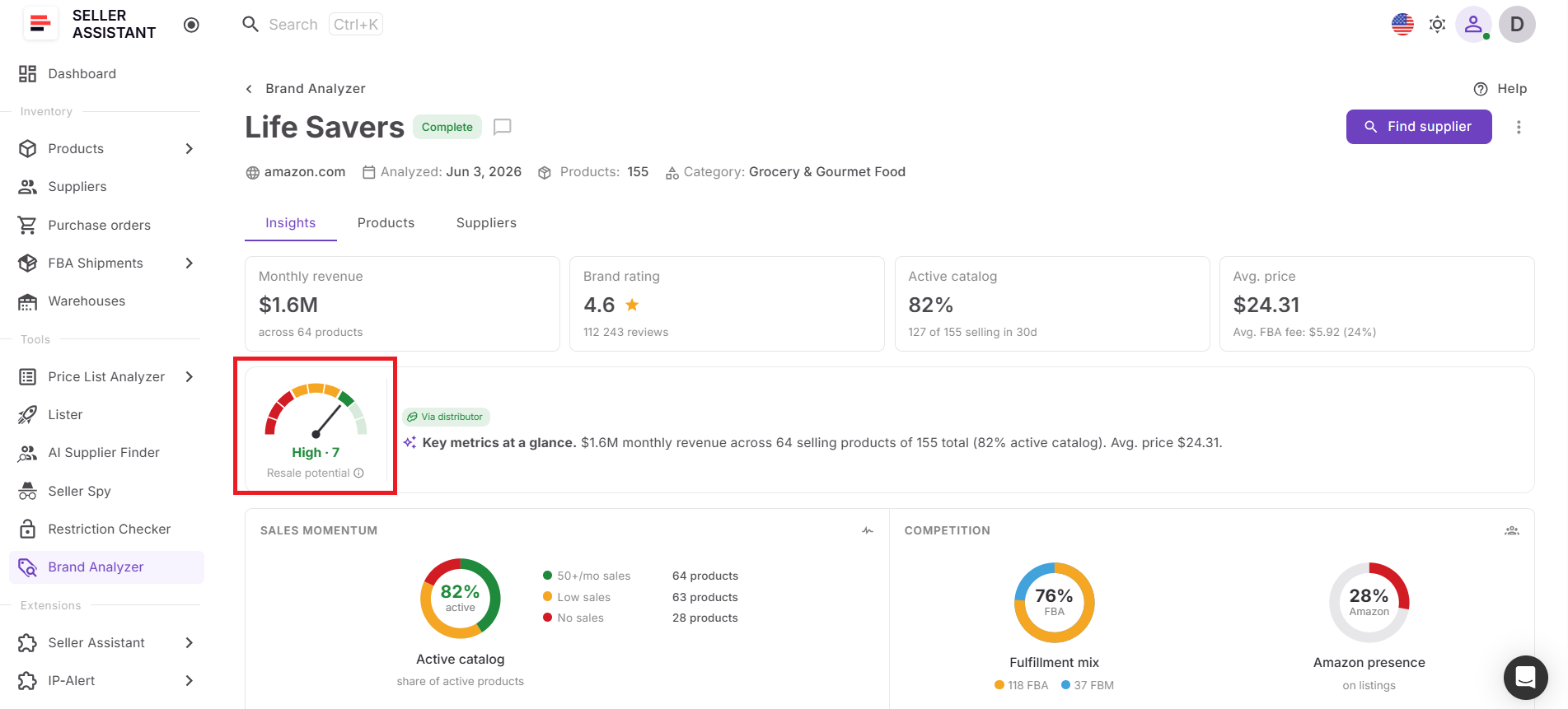
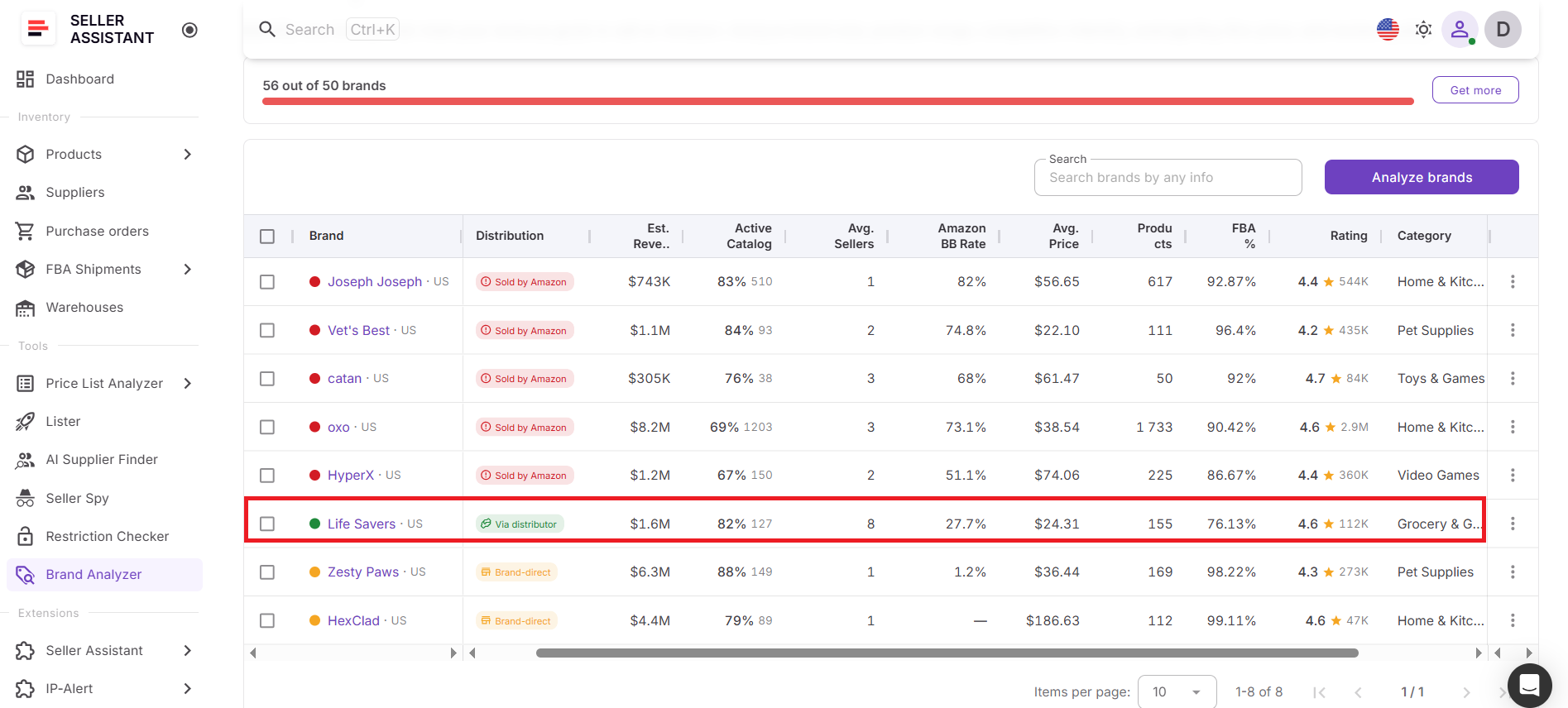
At the brand level, Brand Analyzer provides key qualification metrics including estimated monthly revenue, active catalog percentage, product count, average seller count, Amazon Buy Box rate, average price, FBA share, rating, category, and distribution type. These metrics help sellers determine whether a brand has sufficient demand, manageable competition, and room for growth.
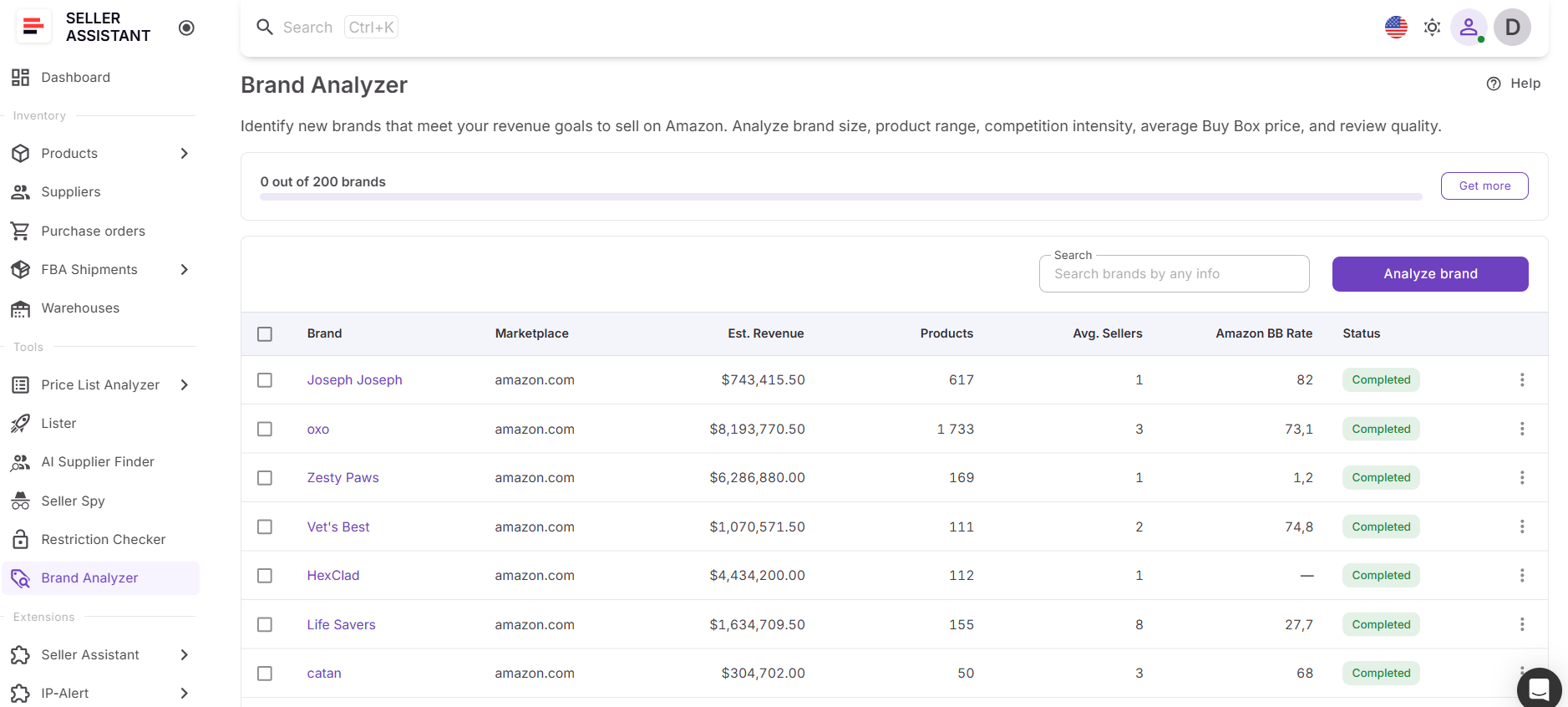
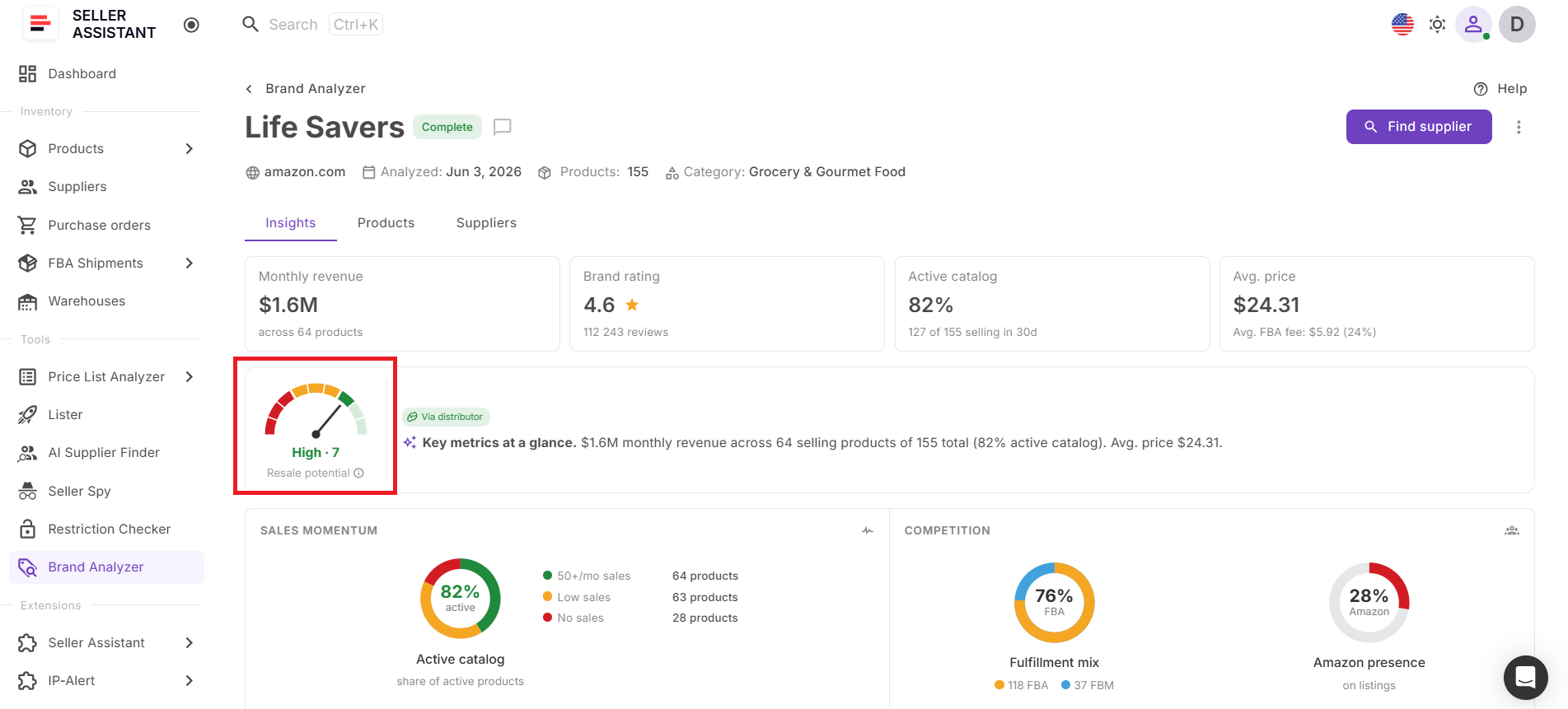
The tool also includes AI-powered analytics. Each brand receives a Resale Potential Score based on factors such as Amazon competition, seller count, average price point, sales velocity, market size, and FBA share. Brands are automatically categorized as High, Medium, or Low potential. In addition, an AI-generated summary explains the brand’s market position and sourcing opportunity in plain language.
Product-level and supplier-level insights
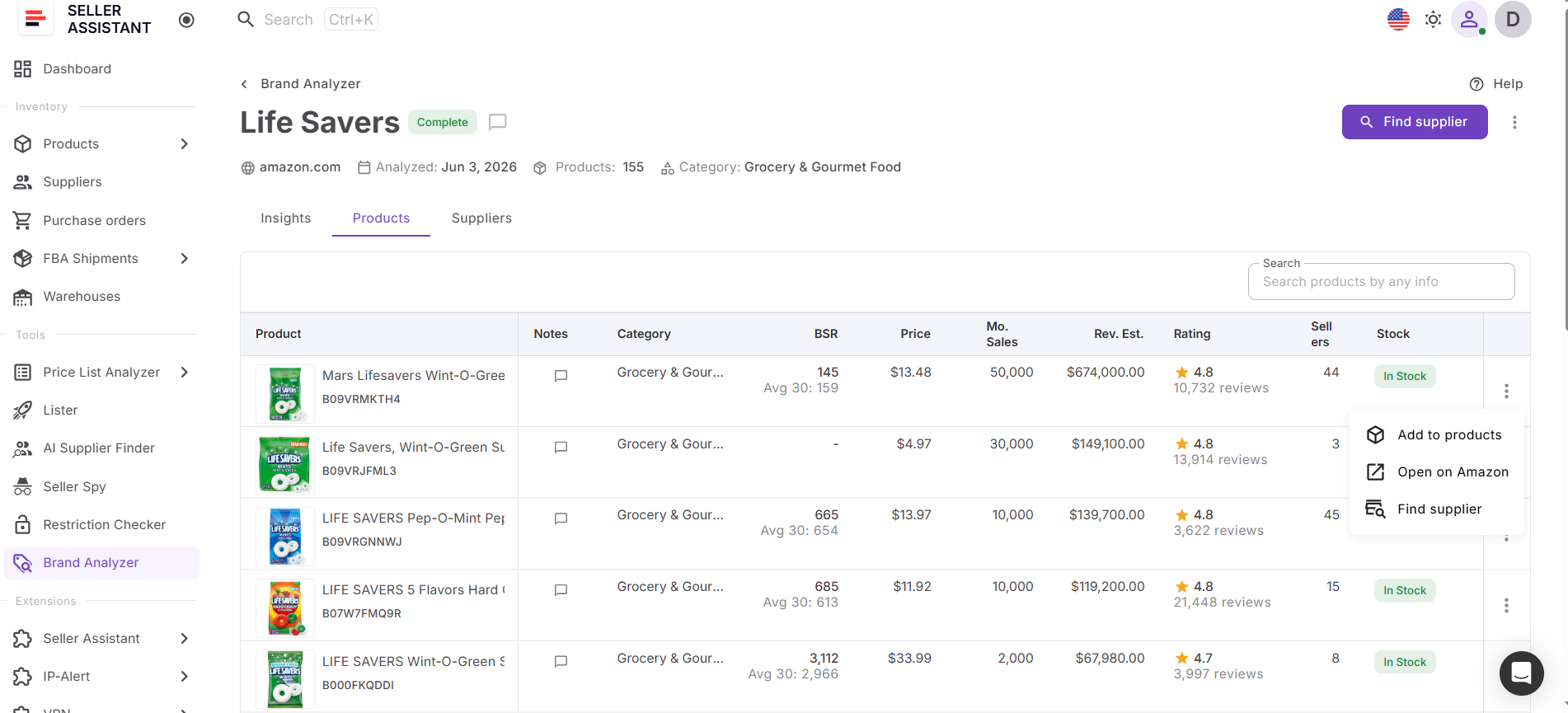
Beyond brand qualification, Brand Analyzer provides detailed product-level analytics through the Products dashboard. Sellers can review ASIN performance, revenue estimates, seller counts, Buy Box data, BSR trends, ratings, reviews, Buy Box sellers, UPC, EAN, model information, and other product metrics to identify the best sourcing opportunities within a brand.
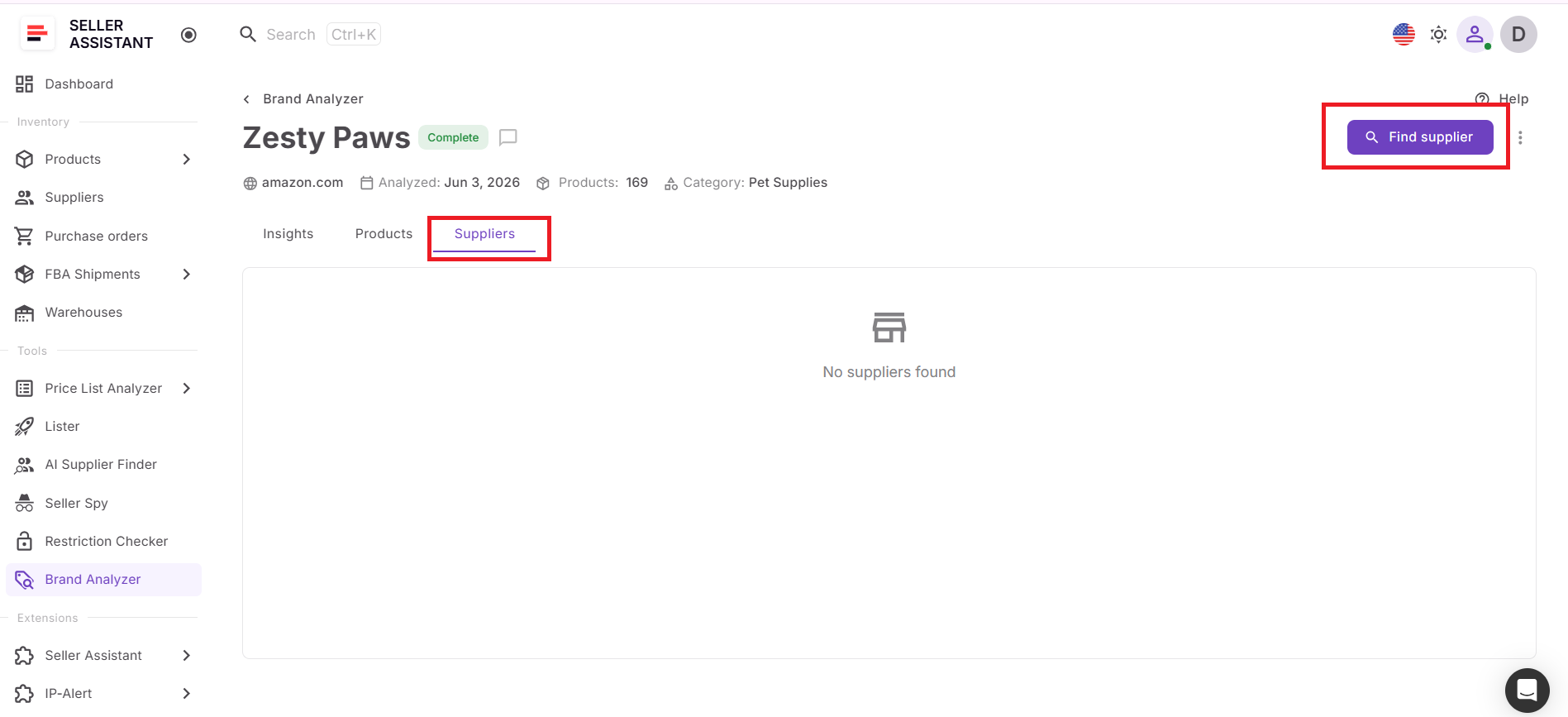
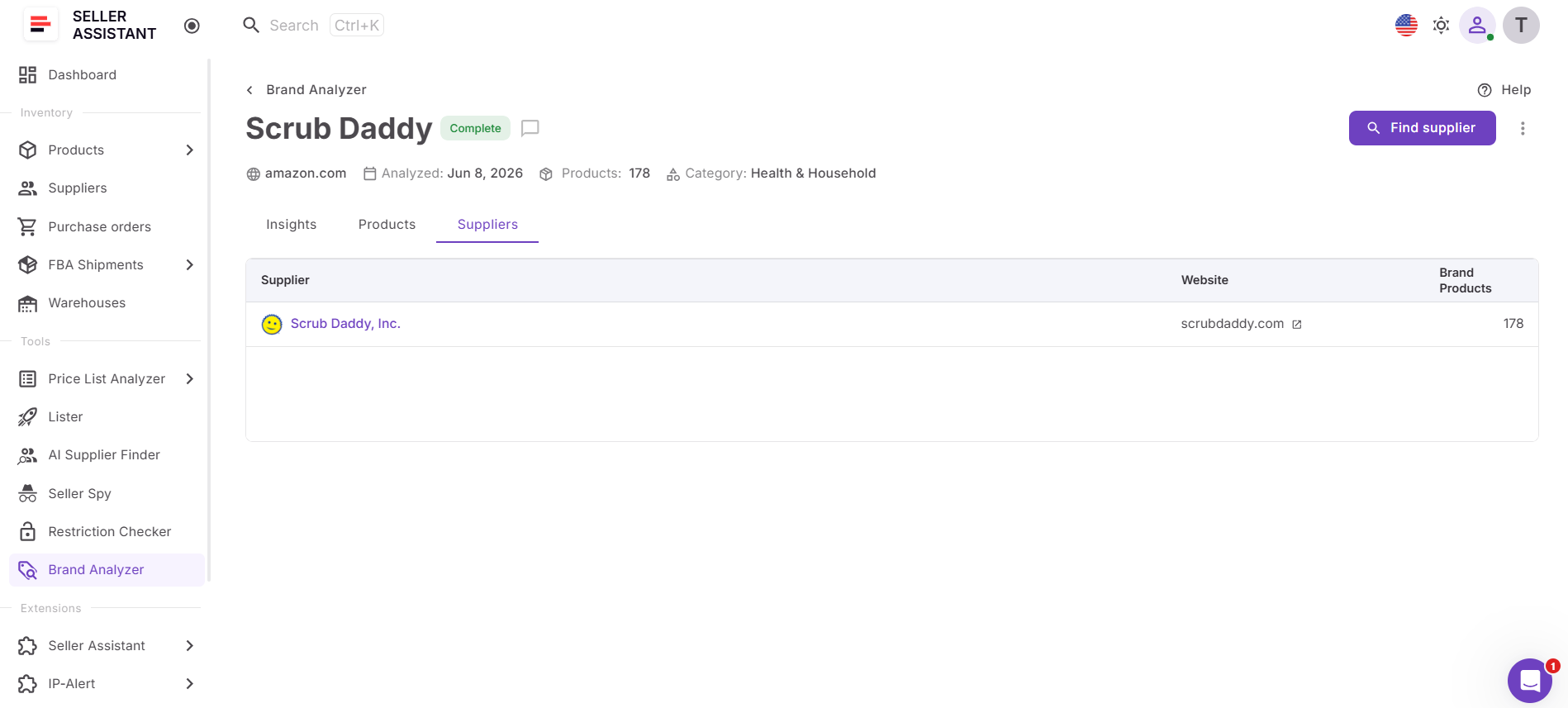
The Suppliers dashboard helps connect research with execution by providing supplier-related insights for analyzed brands.
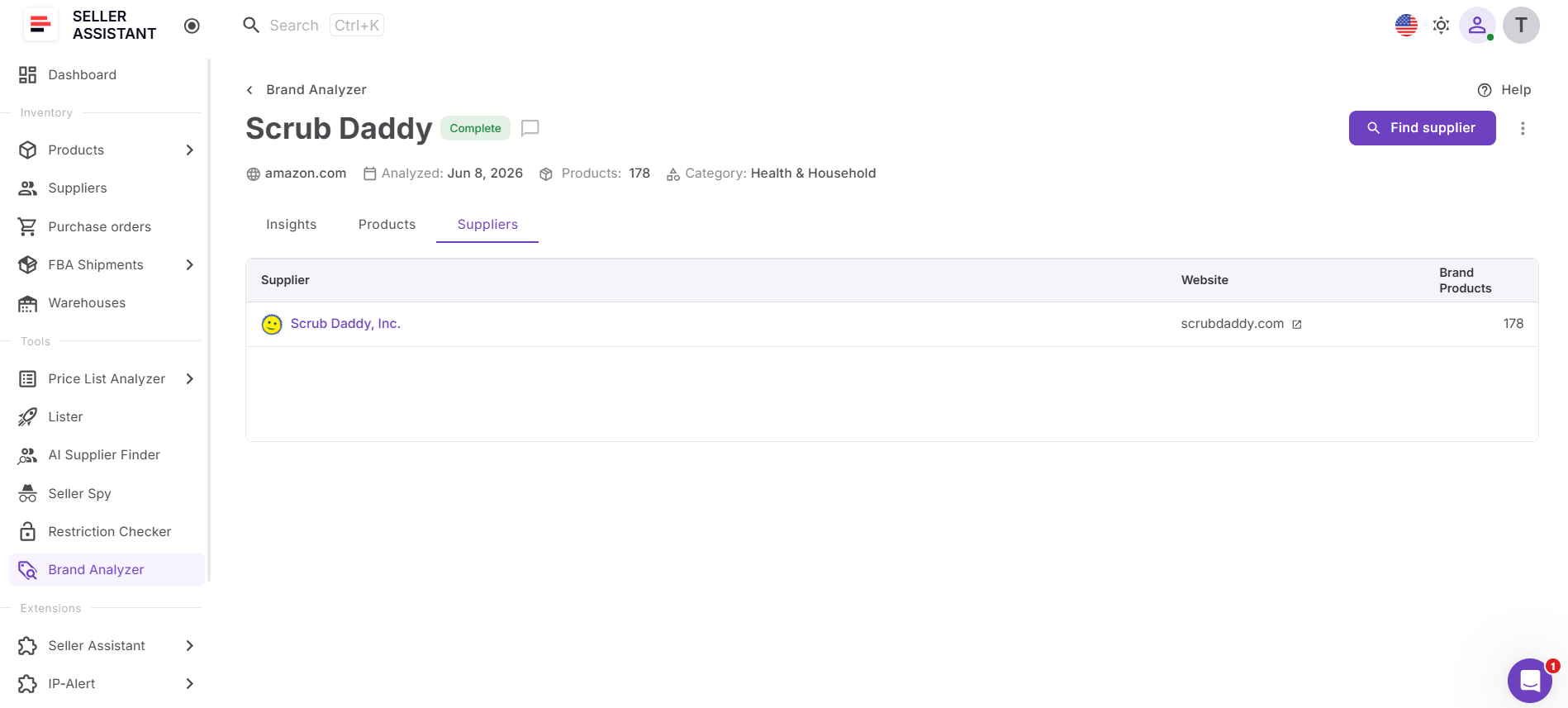
Sellers can also launch AI Supplier Finder directly from Brand Analyzer to discover manufacturers, distributors, and wholesalers connected to the brand.
Why brand-level research matters
Successful wholesale sourcing starts with qualifying brands before products. A brand may have a few attractive ASINs, but if Amazon dominates the Buy Box, competition is excessive, demand is weak, or the catalog lacks depth, scaling becomes difficult. Brand Analyzer helps sellers identify these issues early and focus on brands that support profitable and sustainable growth.
Keep brand research up to date
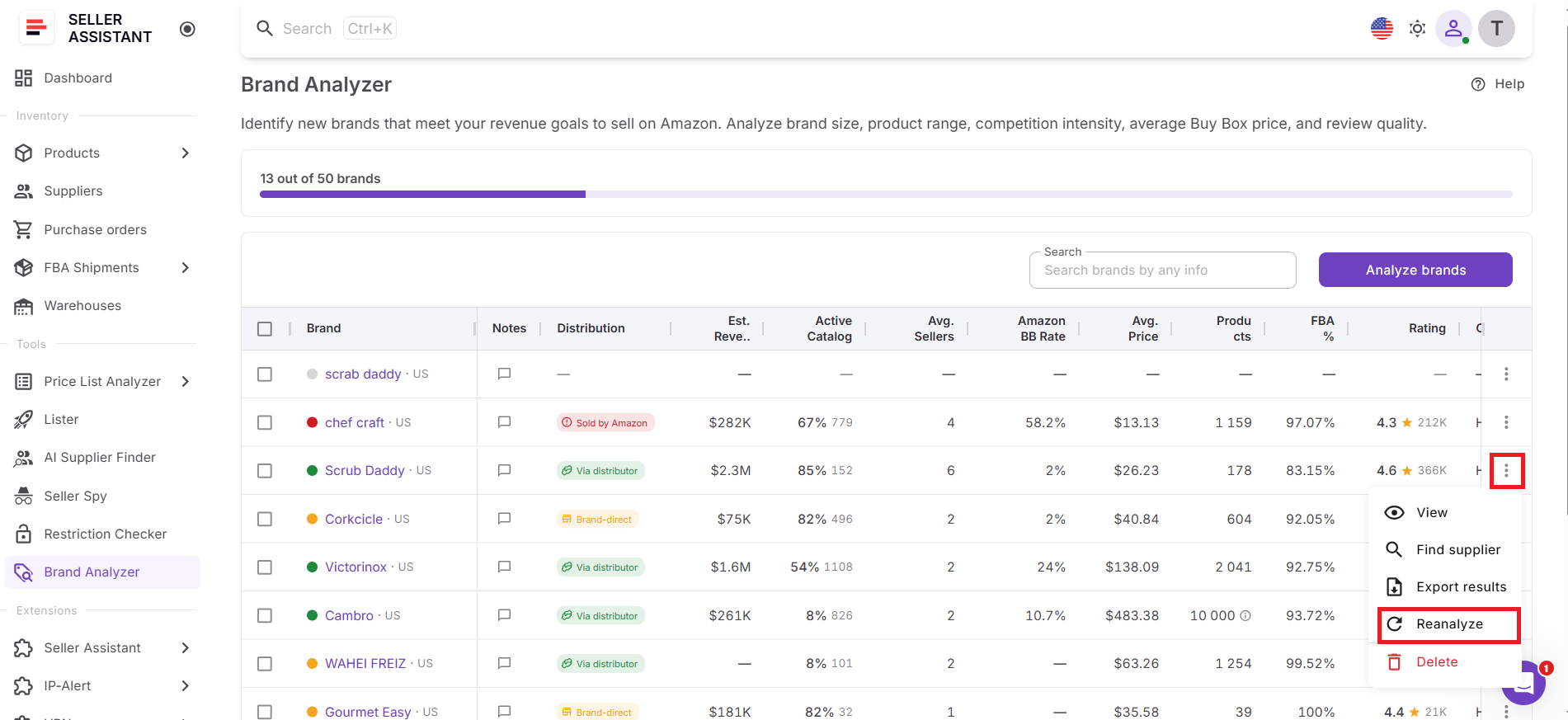
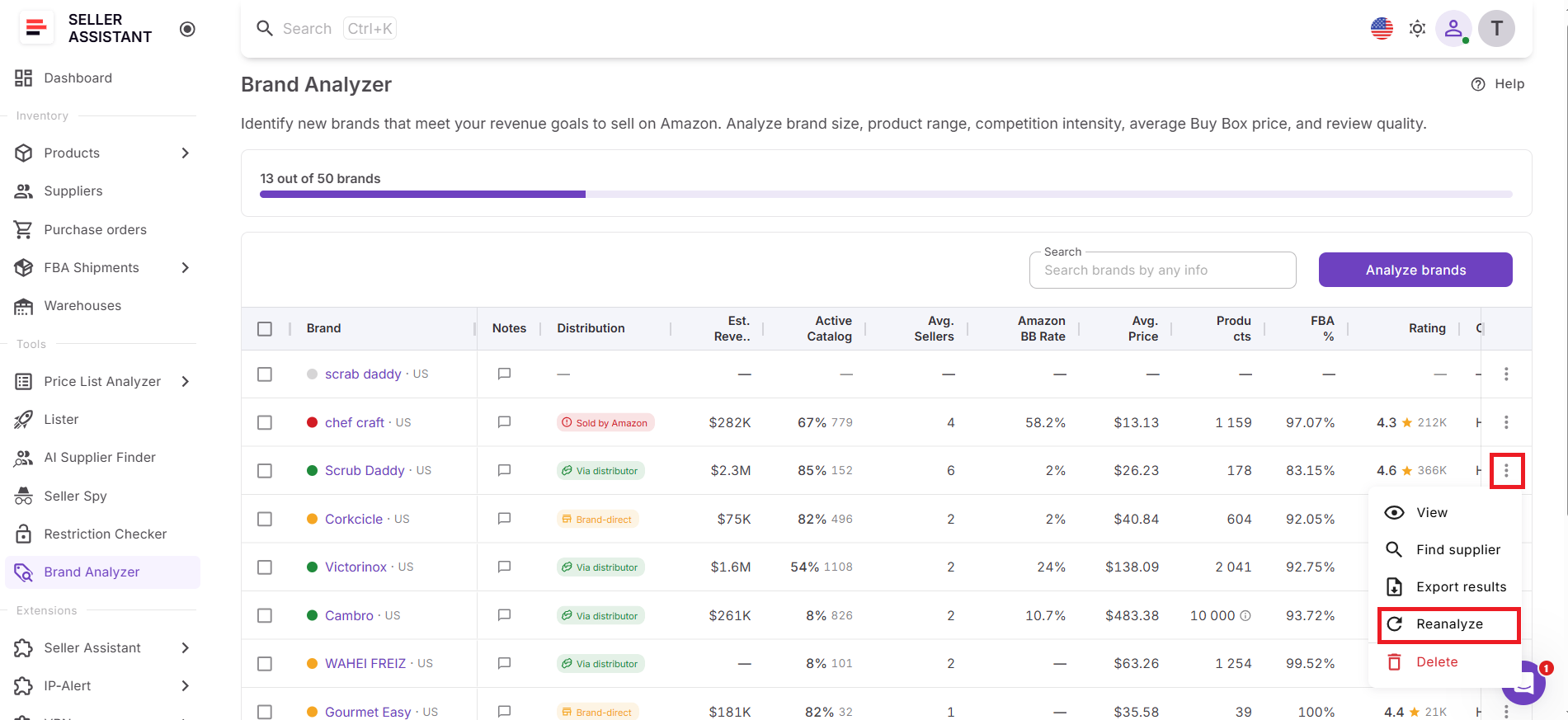
Marketplace conditions change constantly. Seller counts, Amazon’s presence, pricing, demand, and catalog activity can look very different from what they were weeks or months ago. With Brand Reanalysis, sellers can instantly refresh an existing analysis by opening the three-dot menu next to a brand and clicking Reanalyze. The tool updates the brand using the latest marketplace data, recalculates the Resale Potential Score, and generates a refreshed AI summary.
Part of a connected sourcing workflow
Brand Analyzer is part of Seller Assistant’s end-to-end sourcing ecosystem. Sellers can move directly from brand research to supplier discovery with AI Supplier Finder, validate eligibility with Bulk Restriction Checker, evaluate supplier catalogs using Price List Analyzer, save opportunities in Product Database, and generate purchase orders through the Purchase Orders Module.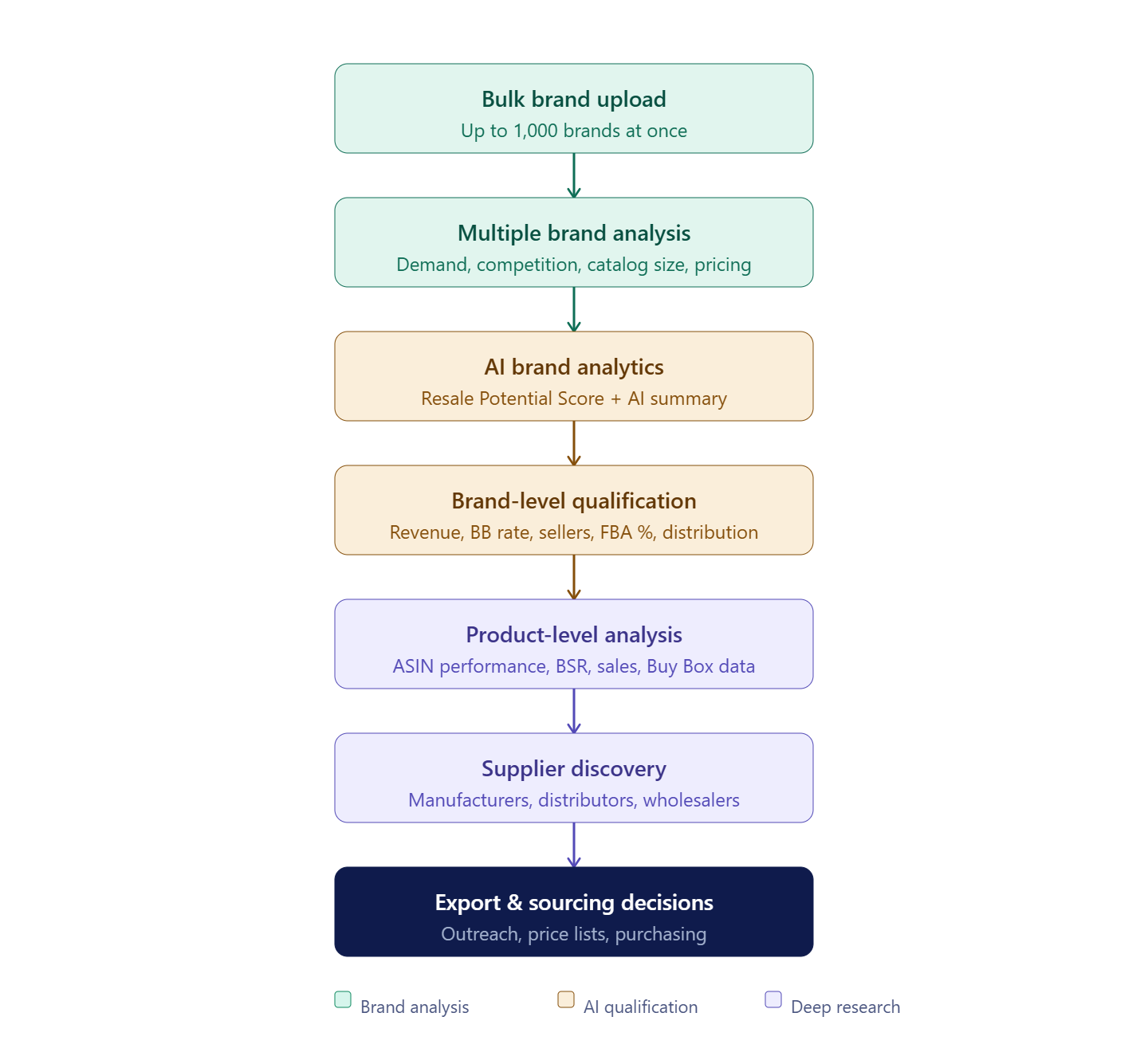
Rather than functioning as a standalone research tool, Brand Analyzer serves as the brand qualification layer within a connected sourcing workflow, helping sellers discover, evaluate, monitor, and source profitable Amazon opportunities more efficiently.
What Can You Do with Brand Analyzer?
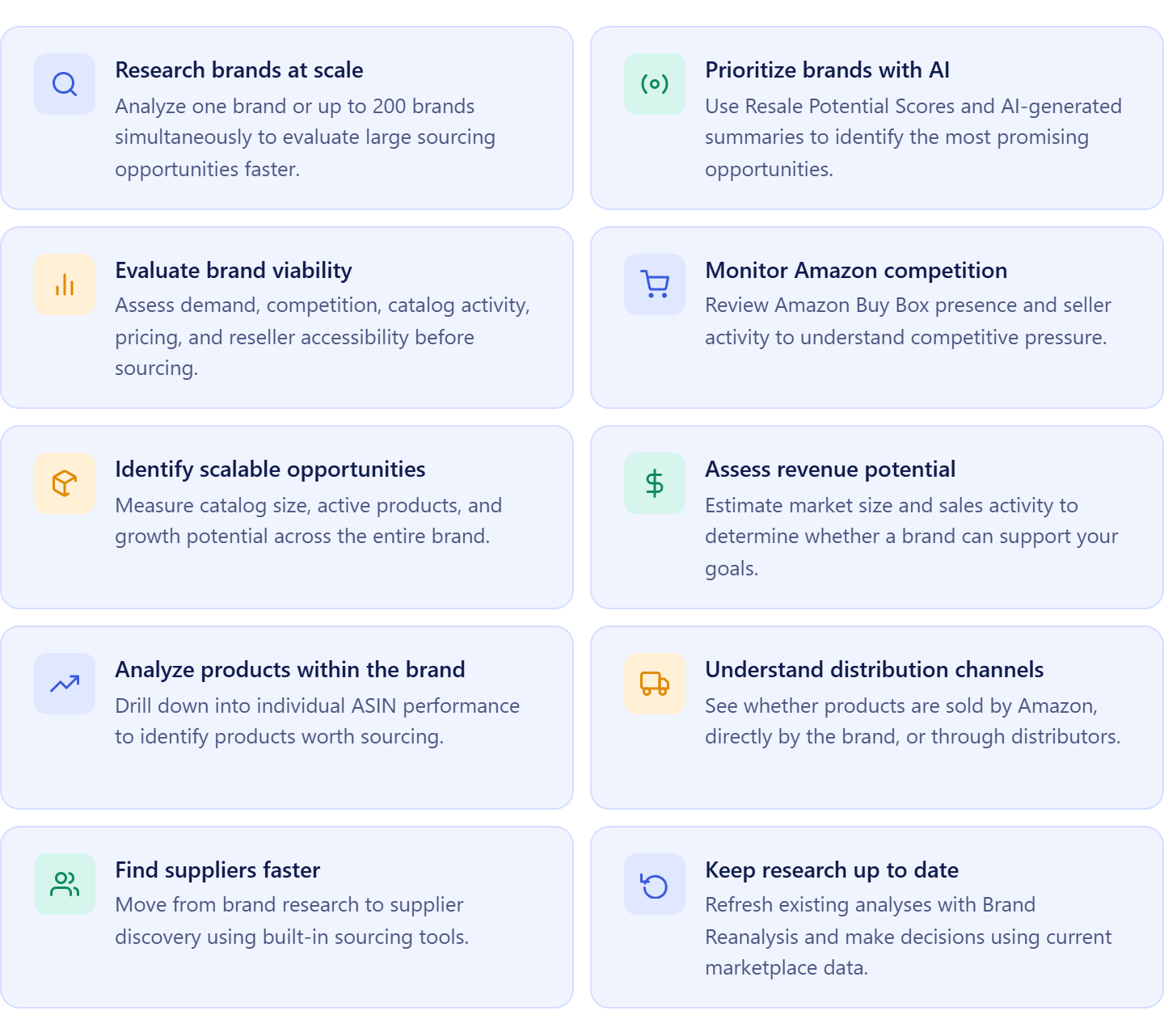
Brand Analyzer helps Amazon wholesale sellers, online arbitrage sellers, and dropshippers research, qualify, and monitor brands before investing time in supplier outreach or product analysis. Instead of manually reviewing catalogs and individual ASINs, sellers get a complete view of a brand’s performance, competition, demand, supplier accessibility, and resale potential in one place.
The tool combines bulk brand analysis, AI-powered insights, brand-level metrics, product analytics, and supplier discovery to help sellers make faster and more informed sourcing decisions.
Analyze up to 200 brands at once
Research brands individually or upload large brand lists for bulk analysis. Brand Analyzer can process up to 200 brands simultaneously, making it ideal for evaluating distributor catalogs, supplier lists, competitor storefronts, trade show prospects, and other large sourcing opportunities.
Evaluate reseller potential with AI
Every analyzed brand receives a Resale Potential Score based on Amazon competition, seller count, average price point, sales velocity, market size, and FBA share. Brands are automatically categorized as High, Medium, or Low potential, helping sellers prioritize opportunities faster.
Get AI-generated brand insights
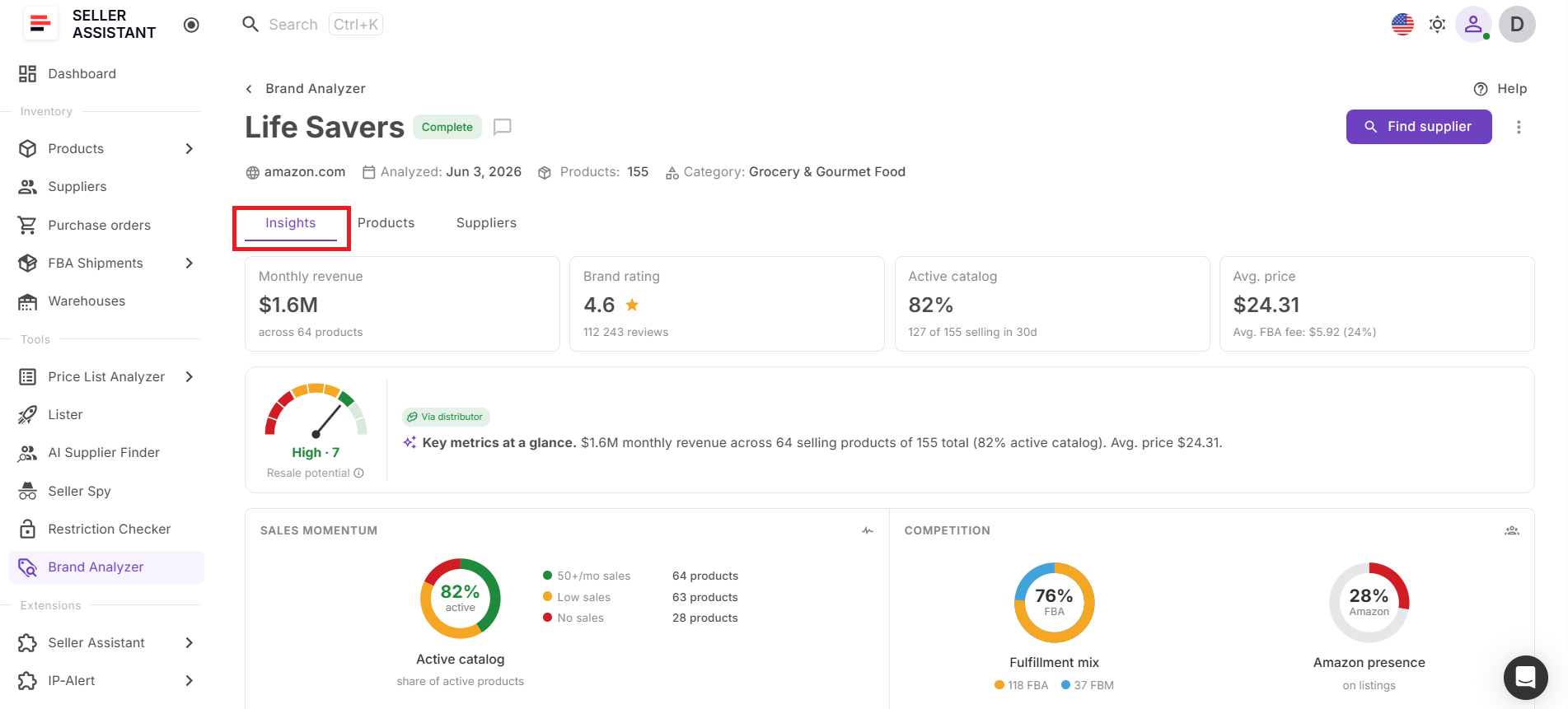
Brand Analyzer automatically creates an AI-powered summary explaining a brand’s market position, competition level, and sourcing opportunity. This helps sellers quickly understand whether a brand deserves further investigation without manually interpreting every metric.
Understand how products reach the market
Review the brand’s distribution type to understand whether products are primarily sold by Amazon, directly by the brand, or through distributors. This provides valuable insight into supplier accessibility and reseller friendliness.
Measure brand demand and growth potential
Analyze estimated monthly revenue, active catalog percentage, product count, ratings, and category data to determine whether a brand has enough demand and catalog depth to support long-term growth.
Monitor Amazon and seller competition
Review Amazon Buy Box rate, average seller count, FBA share, and top seller activity across the brand. These metrics help sellers determine whether competition is manageable and whether third-party sellers have room to succeed.
Evaluate pricing and marketplace dynamics
Analyze average selling prices, historical performance trends, Buy Box behavior, and catalog activity to understand whether the brand supports sustainable margins and stable demand.
Explore product opportunities within each brand
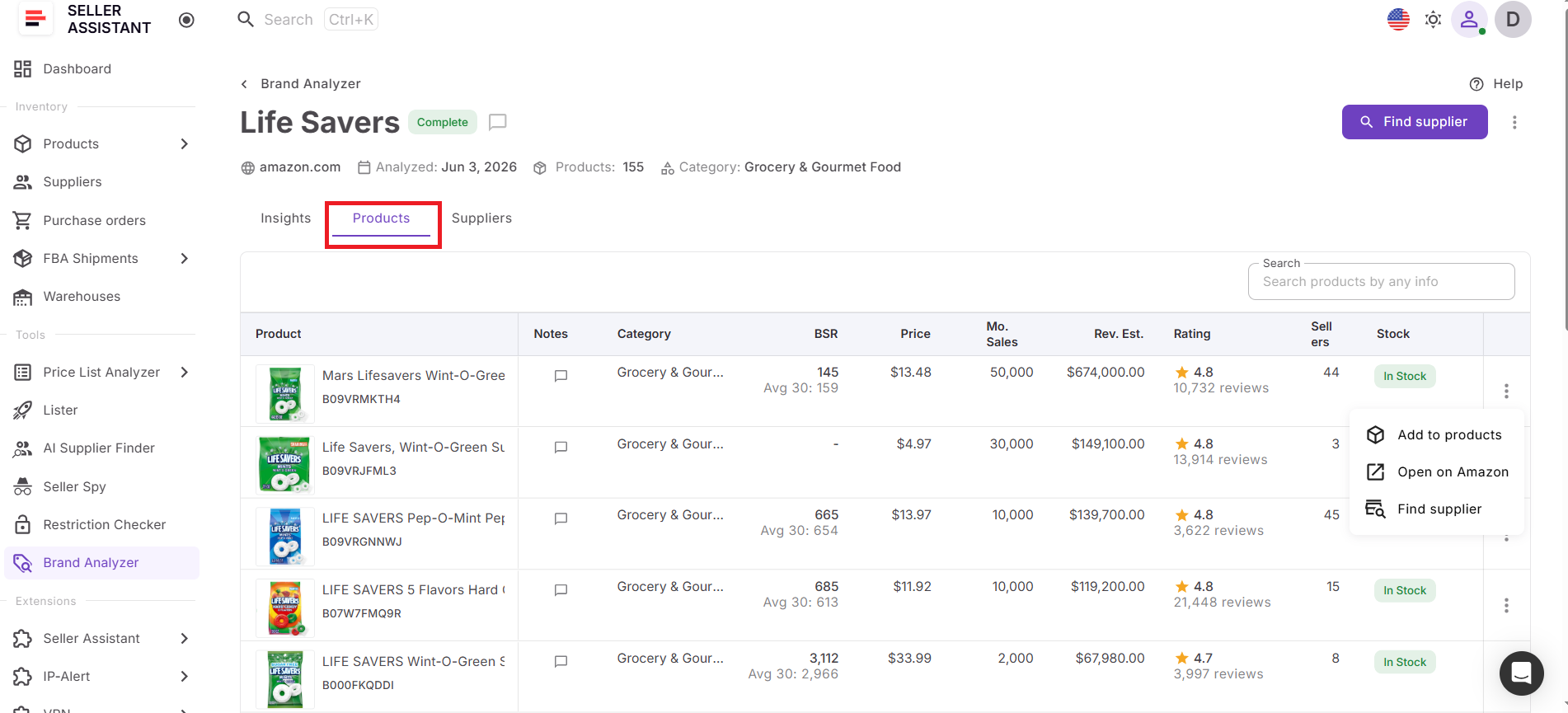
The Products dashboard provides detailed product-level analytics, including revenue estimates, sales performance, seller counts, Buy Box data, BSR trends, ratings, reviews, Buy Box sellers, and product identifiers such as UPC, EAN, and model numbers. This allows sellers to identify the products driving demand, spot high-potential opportunities, and ensure that individual sourcing decisions align with the overall strength of the brand.
Find suppliers connected to the brand
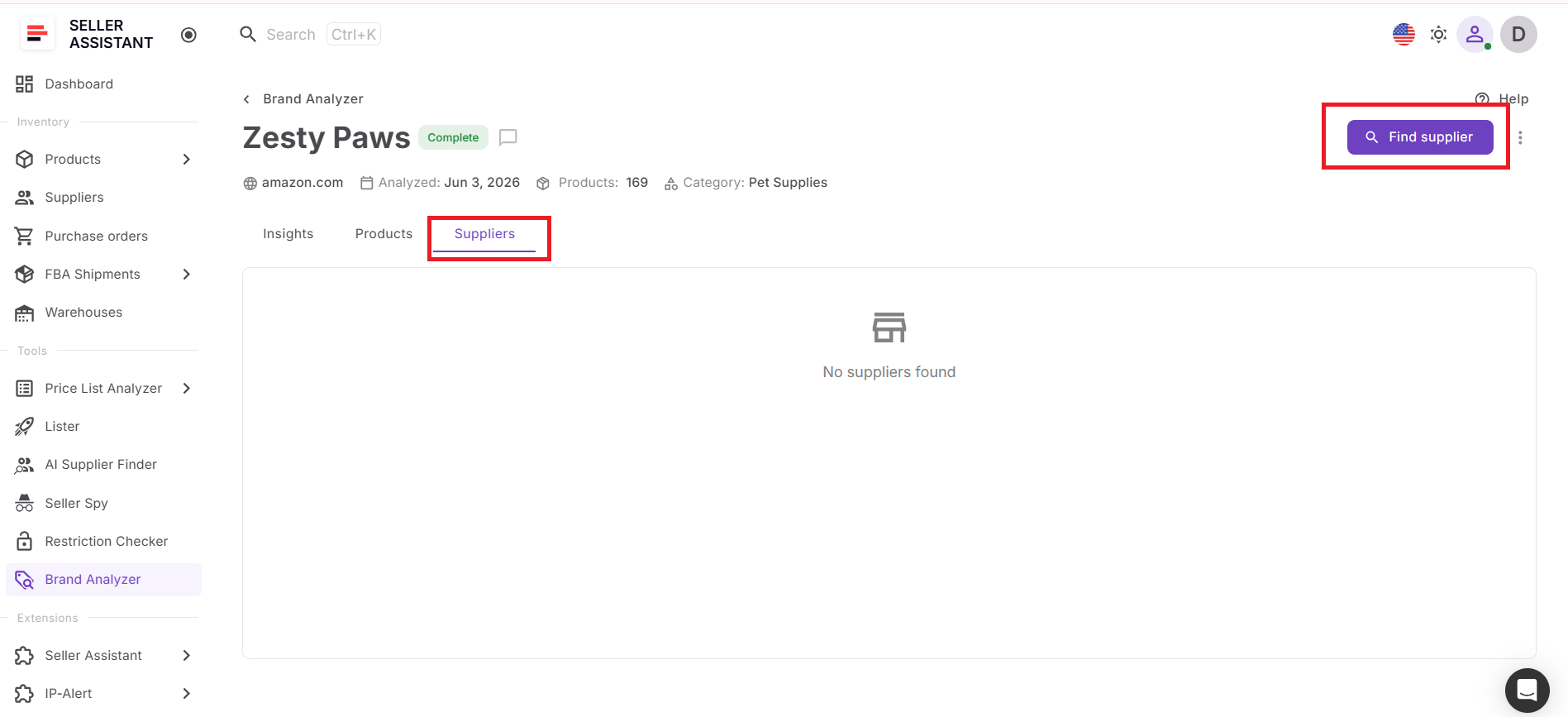
The Suppliers dashboard helps sellers move from research to sourcing by providing supplier-related insights for analyzed brands. Sellers can also launch AI Supplier Finder directly from Brand Analyzer to discover manufacturers, distributors, and wholesalers associated with the brand.
Refresh brand research with one click
Marketplace conditions change constantly. If you need updated data, simply open the three-dot menu next to the brand and click Reanalyze. Brand Analyzer refreshes the analysis using the latest marketplace information, updates metrics, recalculates the Resale Potential Score, and generates a new AI summary.
Access all brand insights in one workspace
Brand Analyzer organizes research into dedicated dashboards for Insights, Products, and Suppliers. This gives sellers a structured workflow for evaluating brands, identifying products, finding suppliers, and making sourcing decisions without switching between multiple tools or spreadsheets.
How Brand Analyzer works
Brand Analyzer evaluates brands at multiple levels, helping sellers move from initial brand discovery to detailed sourcing decisions. Instead of relying on a single metric or reviewing products one by one, the tool combines bulk brand research, AI-powered insights, brand qualification, product analysis, supplier discovery, and ongoing brand monitoring in a structured workflow.
Multiple brand analysis
Brand research often starts with large lists collected from distributor catalogs, supplier databases, competitor storefronts, trade shows, or online research. Brand Analyzer allows sellers to analyze one brand or submit up to 1,000 brands simultaneously, making it possible to evaluate sourcing opportunities at scale.
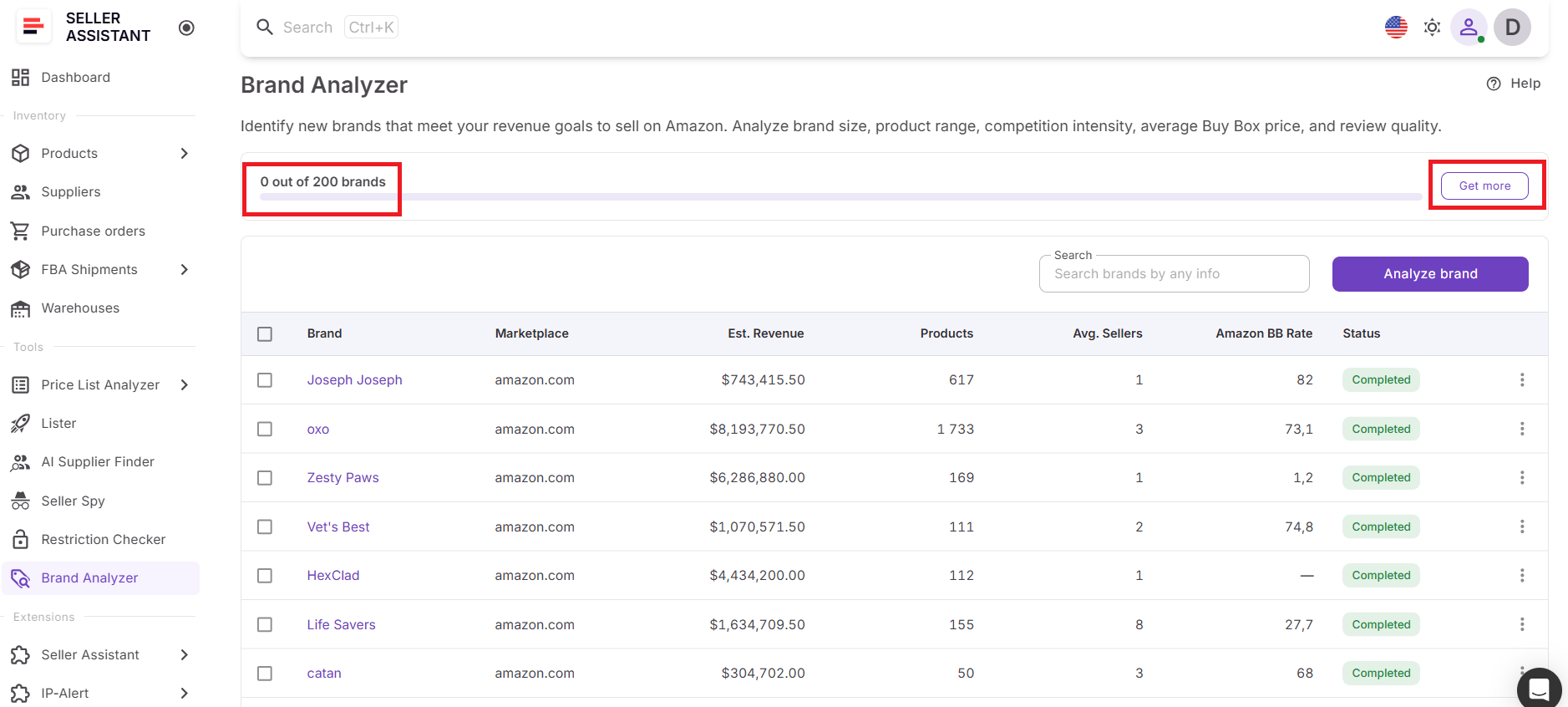
Brands are processed concurrently rather than one at a time. After submission, sellers receive a summary showing how many brands were added for analysis, how many existing analyses were reused, and how many entries were skipped. If a brand has already been analyzed by any team within the last 30 days, Brand Analyzer can instantly use the existing analysis instead of running a new one.
Brand-level analytics
Once the analysis is complete, Brand Analyzer provides a comprehensive overview of each brand’s marketplace performance through the Insights dashboard.
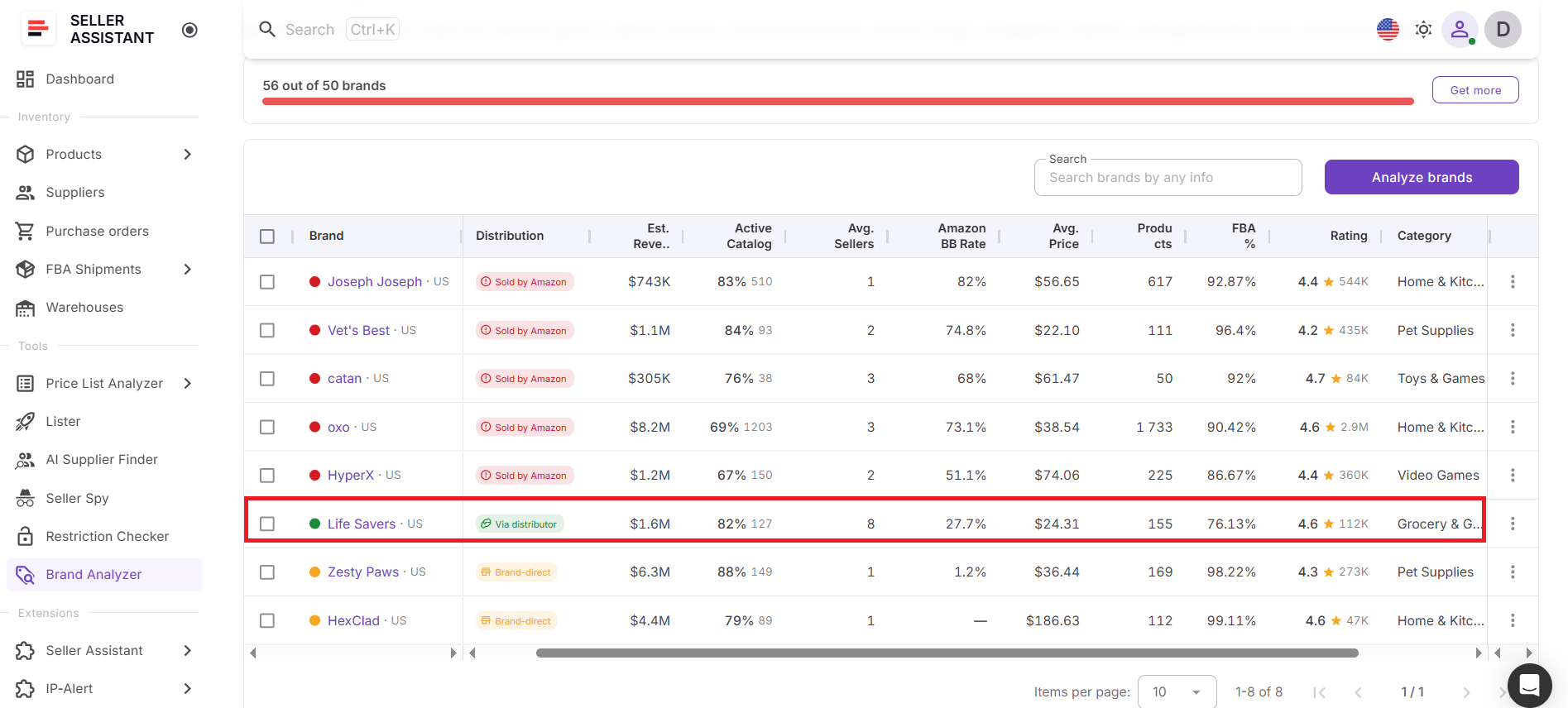
Key metrics include:
- Estimated monthly revenue
- Active catalog percentage
- Number of products
- Average seller count
- Amazon Buy Box rate
- Average selling price
- FBA percentage
- Average rating
- Category
- Distribution type
One of the most valuable insights is Distribution Type, which helps sellers understand how products reach the market:
- Sold by Amazon – Amazon frequently controls the Buy Box and competes directly with third-party sellers.
- Brand-direct – The brand itself is among the leading sellers.
- Via distributor – Distributors are among the top sellers, indicating potential wholesale sourcing opportunities.
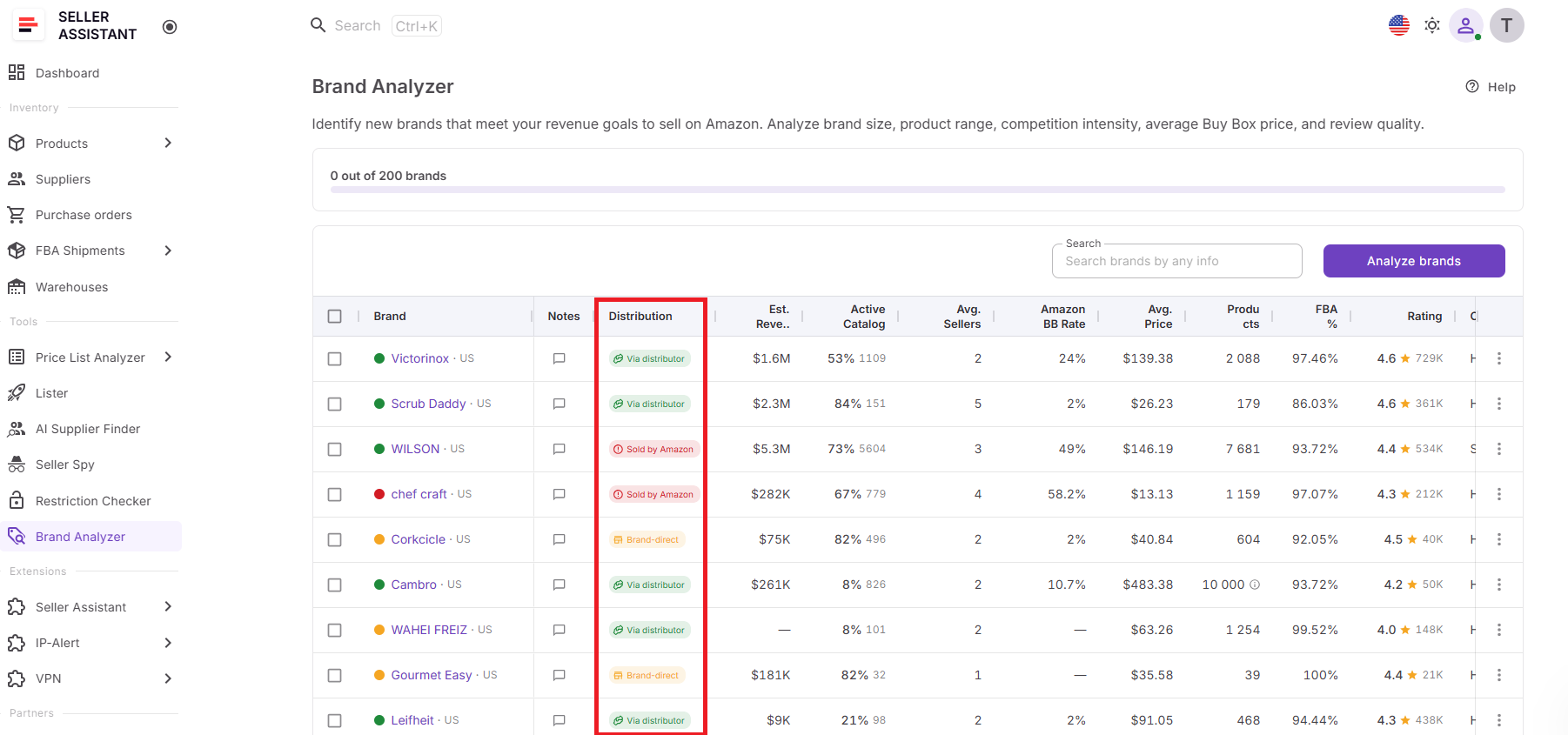
Together, these metrics help sellers assess demand, competition, catalog strength, and supplier accessibility before investing time in deeper research.
AI brand analytics
Brand Analyzer uses AI to simplify large-scale brand research and help sellers prioritize opportunities faster.
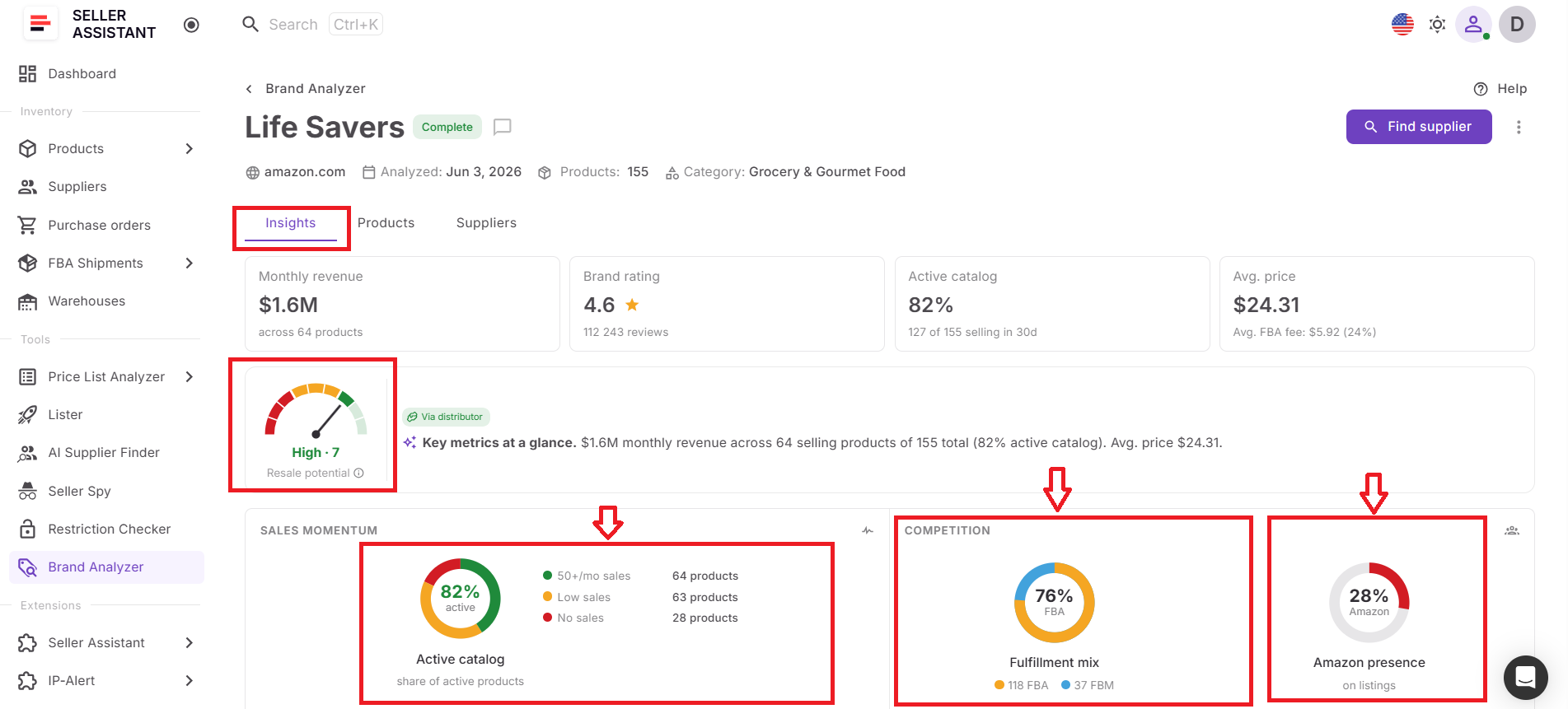
The system automatically calculates a Resale Potential Score based on multiple marketplace signals, including:
- Amazon competition
- Seller count
- Average price point
- Sales velocity
- Market size
- FBA share
- Top brand sellers
Based on the results, each brand receives a High, Medium, or Low resale potential rating.
In addition, Brand Analyzer generates an AI-powered brand summary that explains the brand’s market position and sourcing potential in plain language. Instead of manually interpreting dozens of metrics, sellers can quickly understand the strengths and weaknesses of each opportunity.
Product-level analytics
After qualifying a brand, sellers can switch to the Products dashboard to analyze the catalog in greater detail.
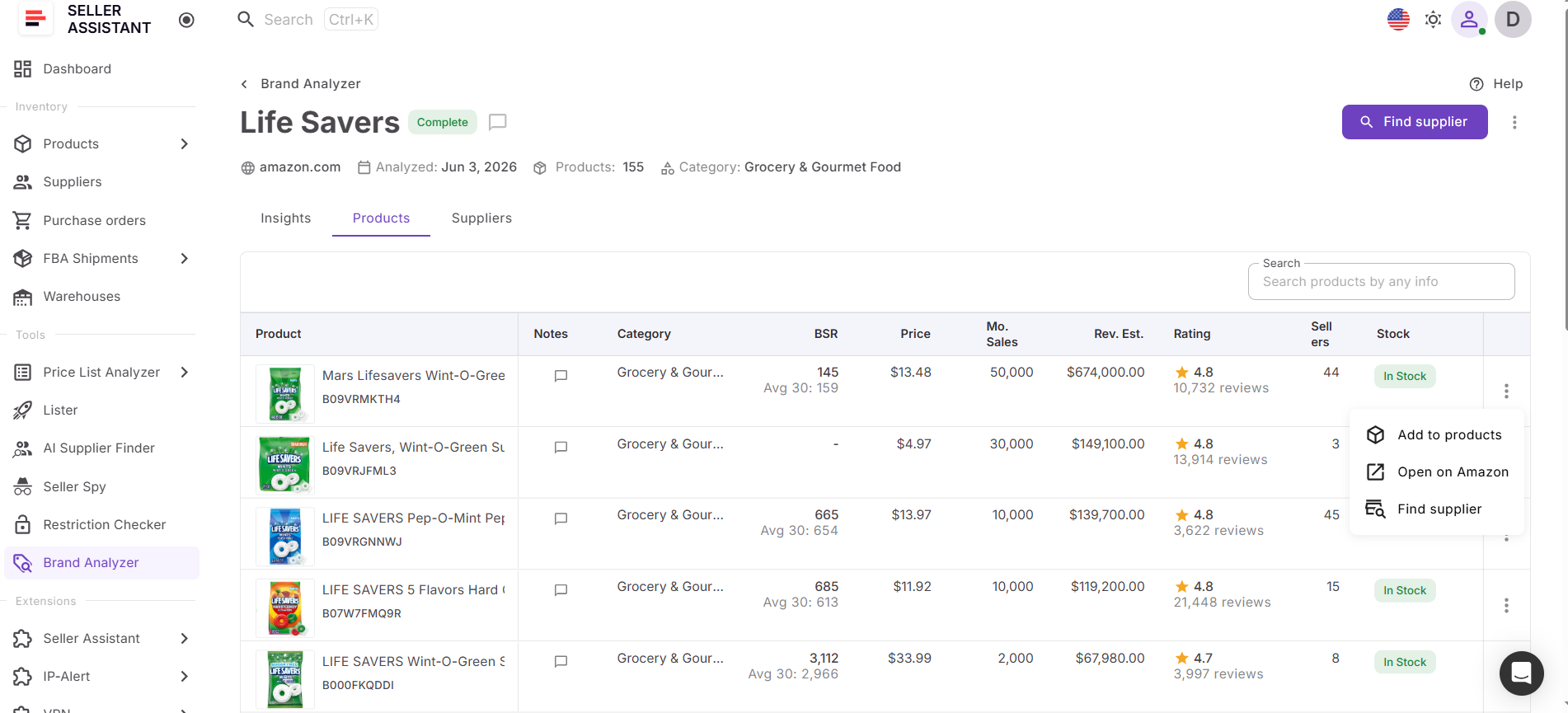
The dashboard provides product-level insights such as:
- ASINs
- Revenue estimates
- Sales performance
- Seller counts
- Buy Box data
- Buy Box sellers
- BSR trends
- Ratings and reviews
- UPC, EAN, and model information
- Historical BSR and pricing data
New long-term performance metrics, including average BSR, average price, and BSR drop counts over the last 365 days, help sellers identify products with consistent demand rather than short-term sales spikes.
This allows sellers to uncover the products driving revenue within the brand and identify sourcing opportunities that align with overall brand quality.
Supplier-level analytics
Brand Analyzer’s Suppliers dashboard helps sellers move directly from research to sourcing.
Instead of starting supplier discovery from scratch, sellers can review supplier information connected to analyzed brands and continue their sourcing workflow from the same interface. For deeper supplier research, Brand Analyzer integrates with AI Supplier Finder, allowing sellers to identify manufacturers, distributors, wholesalers, and other potential supply sources related to the brand.
Brand reanalysis
Brand research is not static. Competition, demand, pricing, and Amazon’s presence can change over time, which is why Brand Analyzer includes Brand Reanalysis.
To refresh an existing analysis, sellers simply open the three-dot menu next to a brand and click Reanalyze. Brand Analyzer updates the brand using the latest marketplace data, refreshes key metrics, recalculates the Resale Potential Score, and generates a new AI summary. This allows sellers to keep their brand research current and make sourcing decisions based on the most recent market conditions.
How Brand Analyzer Metrics Help Identify Profitable Brands
The value of Brand Analyzer lies in its ability to combine multiple data points into a complete picture of a brand’s sourcing potential. Looking at a single metric rarely tells the full story. A brand may generate high revenue but be dominated by Amazon, or it may have low competition but insufficient demand to justify the effort. By analyzing several metrics together, sellers can evaluate demand, competition, catalog strength, pricing environment, and supplier accessibility before moving forward.
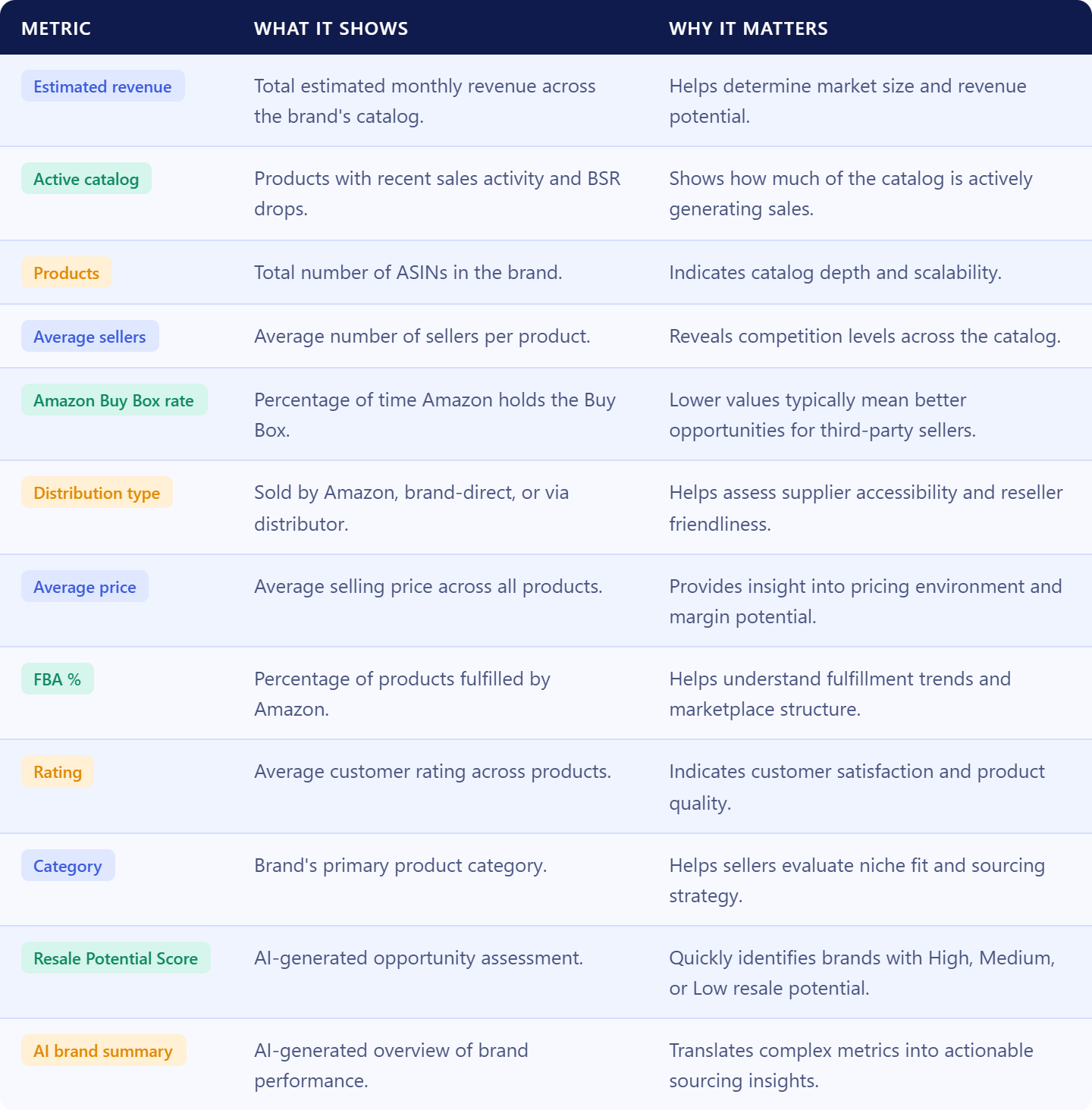
Brand Analyzer organizes these metrics into a structured view that helps wholesale sellers quickly qualify or reject opportunities. Revenue and catalog metrics reveal the size and activity of the opportunity, competition metrics show how difficult it may be to win sales, pricing metrics help estimate margin potential, and distribution data provides insight into how products reach the market. Combined with AI-generated insights and the Resale Potential Score, these metrics help sellers make faster and more informed sourcing decisions.
Rather than spending hours reviewing individual listings, sellers can use these metrics to identify brands that align with their sourcing criteria, prioritize the best opportunities, and focus their efforts on brands that offer the strongest potential for profitable growth.
How to Use Brand Analyzer Step by Step
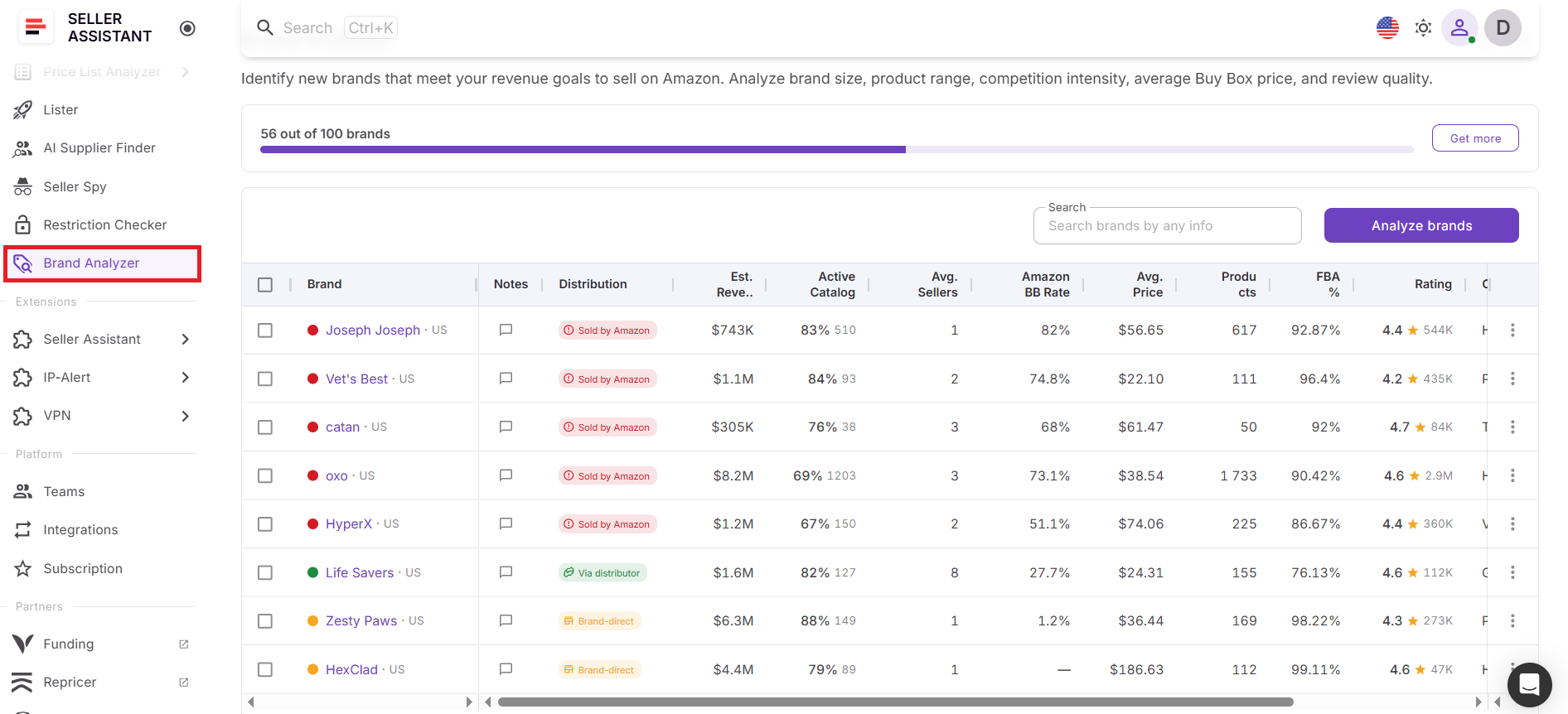
Step 1. Go to Brand Analyzer
Open your Seller Assistant account and select from the Tools section.
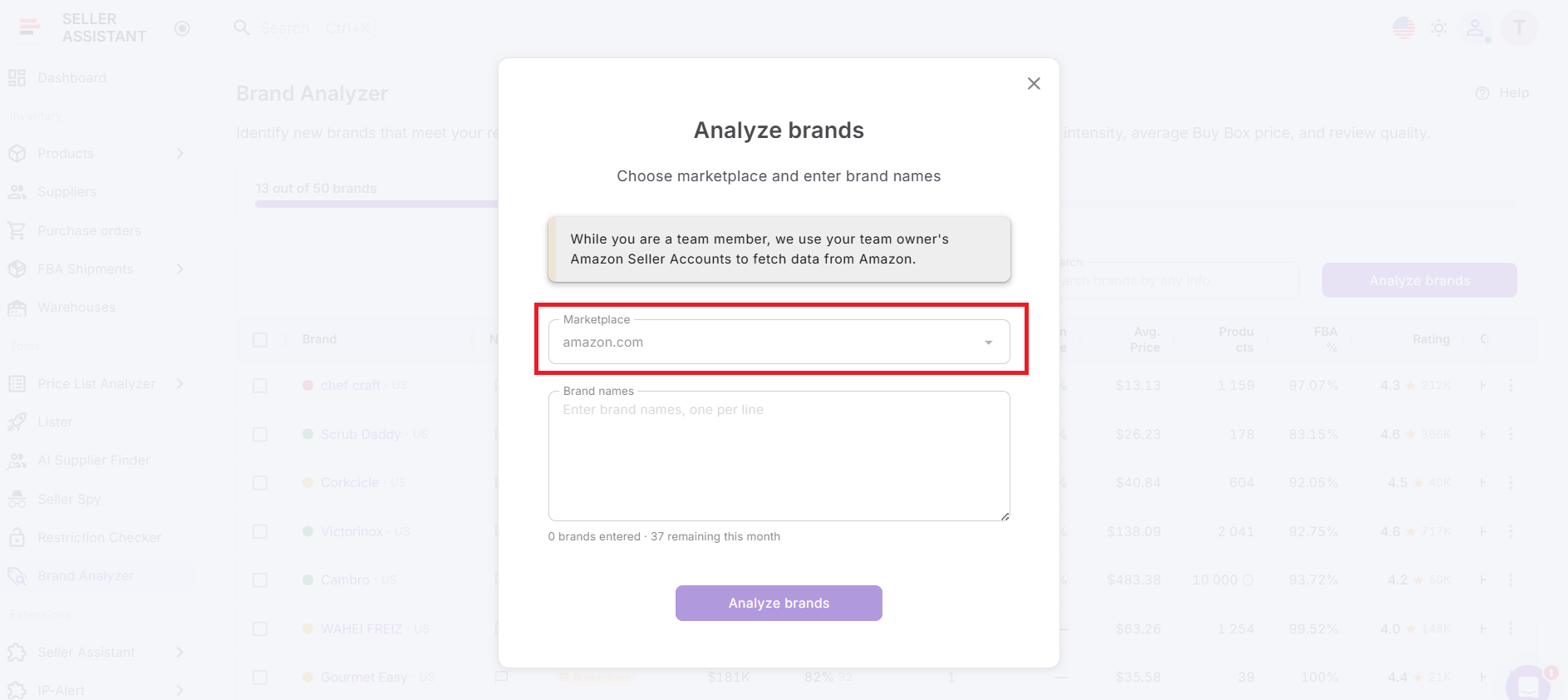
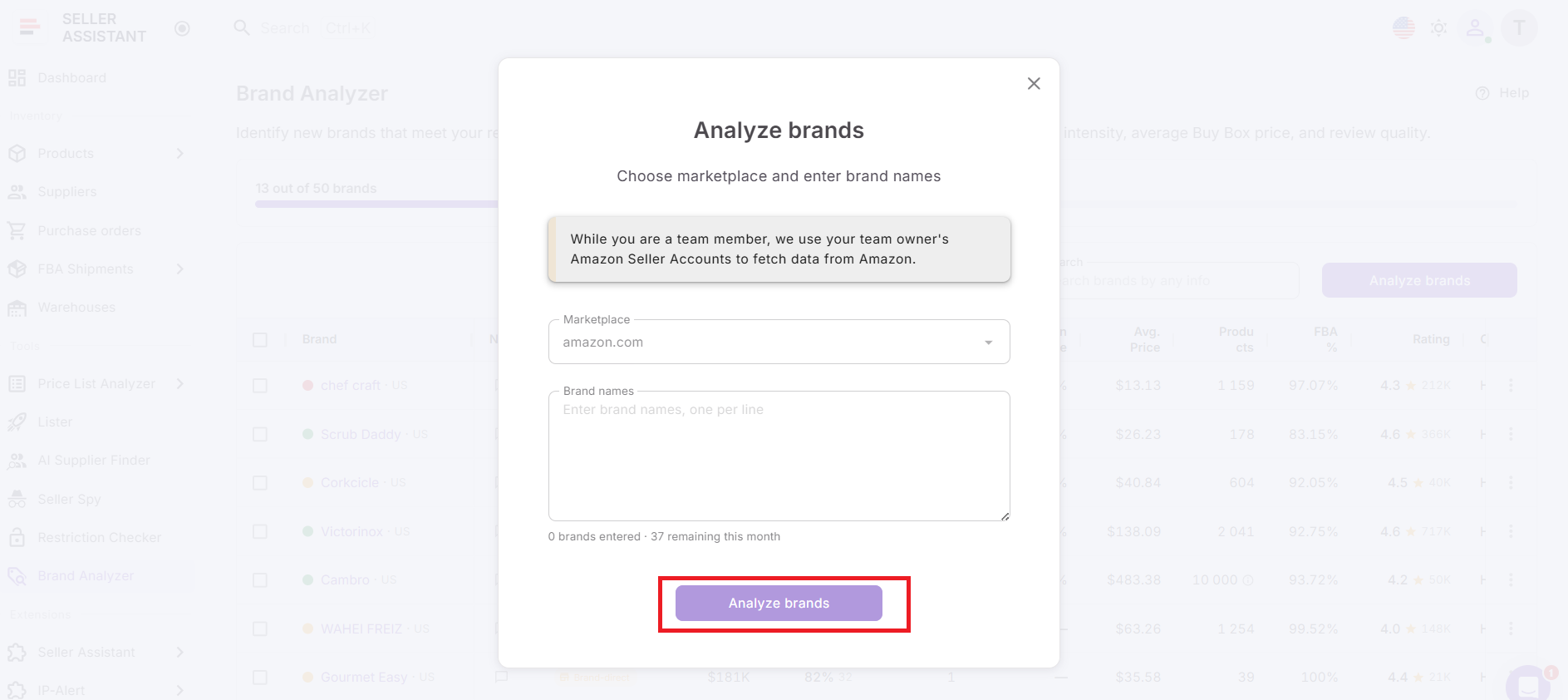
Step 2. Choose the marketplace
Select the Amazon marketplace where you want to research the brand. Brand demand, competition, pricing, and Buy Box behavior can differ by marketplace.
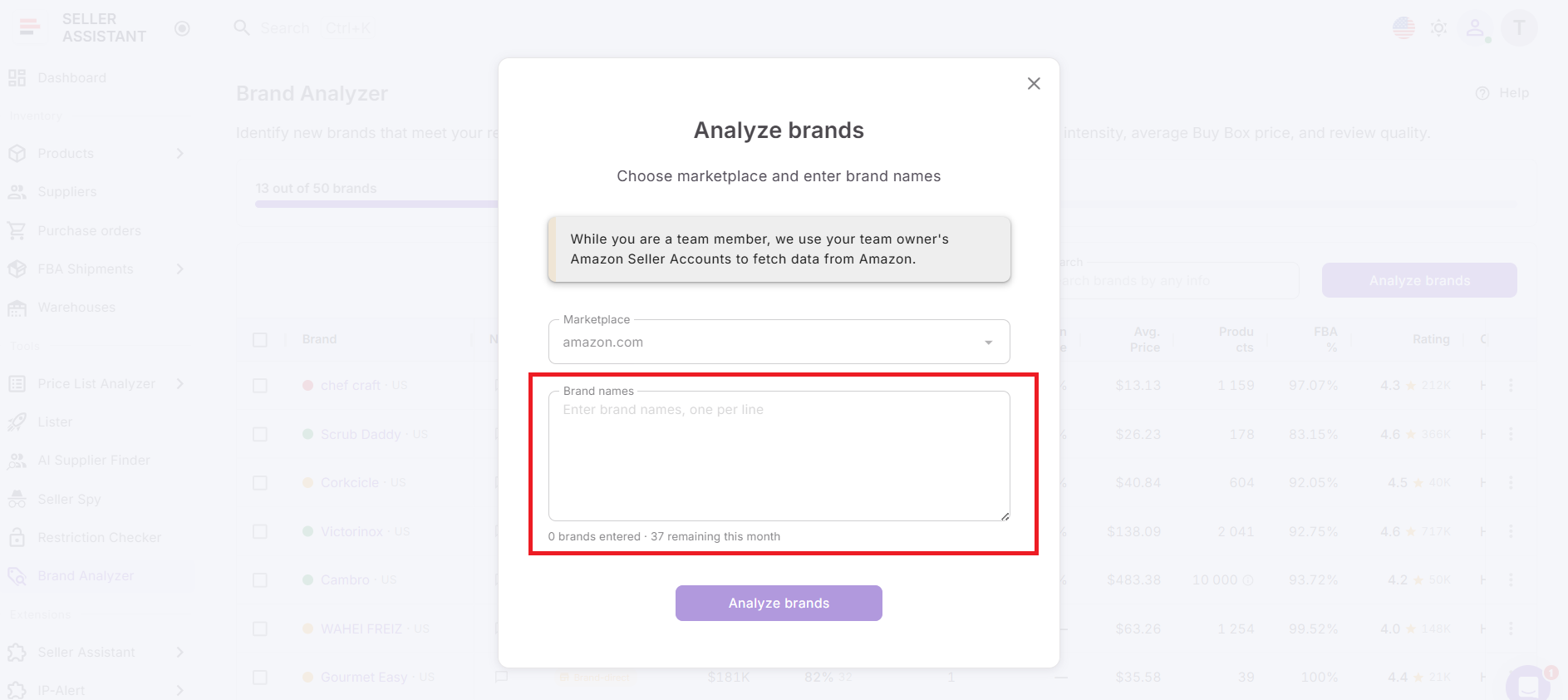
Step 3. Submit brands for analysis
Enter one brand or paste a bulk list with one brand per line. You can submit up to 1,000 brands at once.
Step 4. Start the scan
Run the analysis and let Brand Analyzer process your brands. Multiple brands are analyzed simultaneously, and results analyzed within the last 30 days can be reused.
Step 5. Check resale potential
Review the Resale Potential Score to quickly identify brands marked as High, Medium, or Low opportunity.
Step 6. Review the AI summary
Read the AI-generated brand summary to understand the brand’s market position, competition level, and sourcing potential.
Step 7. Analyze brand metrics
Check estimated revenue, active catalog, seller count, Amazon Buy Box rate, average price, FBA %, rating, category, and distribution type.
Step 8. Explore products
Open the Products dashboard to review individual ASINs, Buy Box sellers, BSR trends, pricing, reviews, UPC, EAN, model, and product-level performance.
Step 9. Review supplier options
Open the Suppliers dashboard or launch supplier discovery to find manufacturers, distributors, and wholesalers connected to the brand.
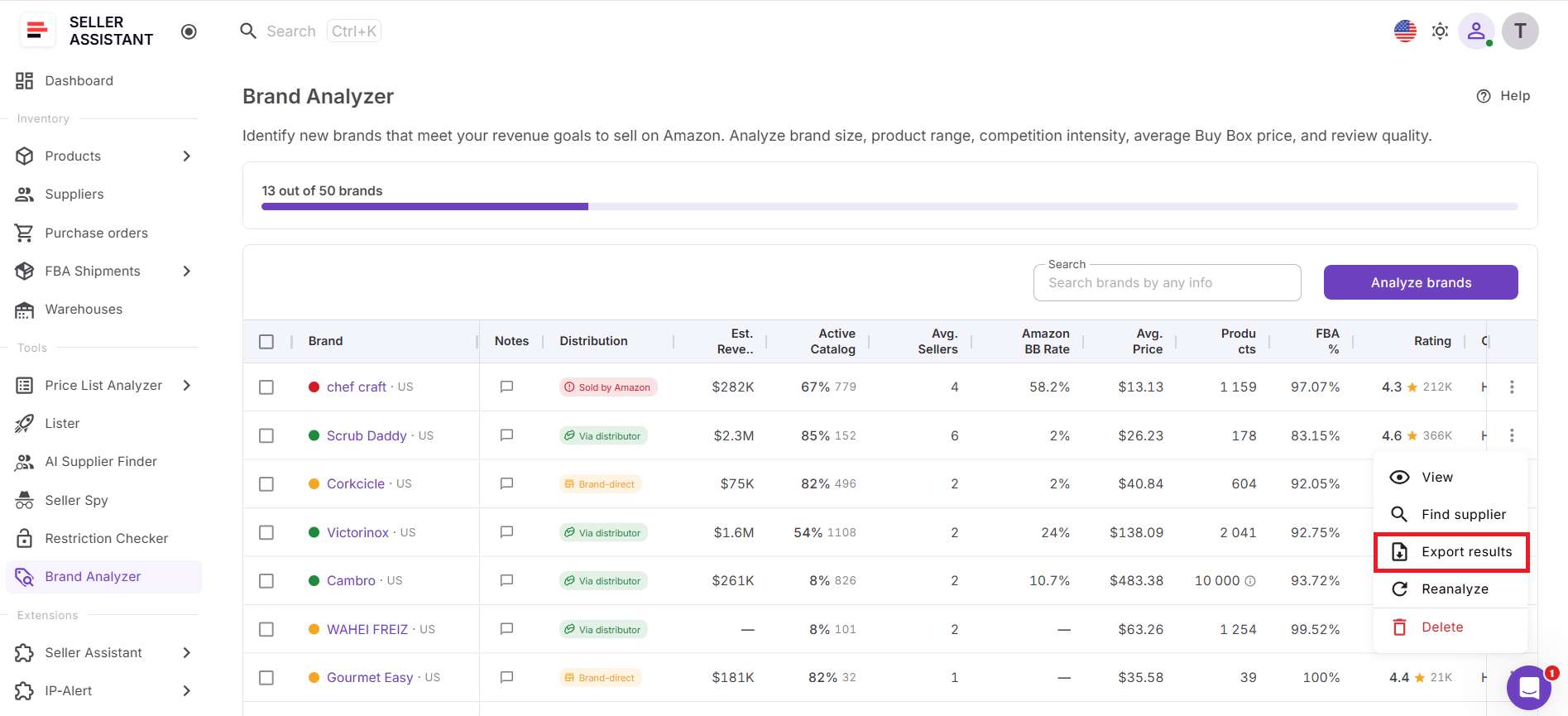
Step 10. Export your data
Download the Excel report for deeper filtering, team review, or the next stage of your sourcing workflow.
FAQ
What is Brand Analyzer?
Brand Analyzer is Seller Assistant’s wholesale brand research tool that helps Amazon sellers evaluate brands before sourcing products. It combines brand-level analytics, AI-powered insights, product data, and supplier information to help sellers identify profitable opportunities faster.
How many brands can I analyze at once?
Brand Analyzer allows you to analyze up to 1,000 brands in a single submission. This makes it easy to evaluate distributor catalogs, supplier lists, competitor brands, and other large groups of sourcing opportunities.
What is the Resale Potential Score?
The Resale Potential Score is an AI-driven assessment that estimates how attractive a brand is for resellers. It is calculated using factors such as Amazon competition, seller count, average price, sales velocity, market size, and FBA share, then assigns a High, Medium, or Low rating.
Can I update a brand analysis after it has been completed?
Yes. You can use the Brand Reanalysis feature by opening the three-dot menu next to a brand and clicking Reanalyze, which refreshes the analysis using the latest marketplace data.
Can Brand Analyzer help me find suppliers?
Yes. Brand Analyzer includes a Suppliers dashboard and integrates with AI Supplier Finder, allowing sellers to identify manufacturers, distributors, wholesalers, and other potential supply sources connected to a brand.
Final Thoughts
Profitable Amazon wholesale sourcing starts long before you upload a price list or place a purchase order – it starts with brand qualification. Seller Assistant’s Brand Analyzer gives you a structured way to evaluate demand, competition, catalog depth, and reseller viability in minutes instead of hours. By filtering brands first, you avoid gated listings, Amazon-dominated catalogs, and oversaturated markets.
As part of Seller Assistant’s connected wholesale workflow, Brand Analyzer helps you move from brand validation to supplier search, bulk analysis, and purchase orders without breaking your process. Use it to build a cleaner sourcing pipeline and scale with data, not guesswork.
Seller Assistant automates and connects every stage of your Amazon wholesale and arbitrage workflow. It brings together in one platform: workflow management tools – Purchase Orders Module, Supplier Database, Warehouse Database, bulk research & sourcing tools – Price List Analyzer, Bulk Restriction Checker, AI Supplier Finder, Brand Analyzer, Seller Spy, Chrome extensions – Seller Assistant Browser Extension, IP-Alert Extension, and built-in VPN by Seller Assistant, and integrations & team access features – seamless API connectivity, integrations with Zapier, Airtable, and Make, and Virtual Assistant Accounts.